Another Look at App Integration in Business Central – Part 2

Recap

See here for part 1 of this series. The challenge that we are trying to solve is to allow Business Central apps to call each other’s functionality without creating a dependency.

⚠️ Reminder: only do this when you cannot create a dependency between the two apps. If a dependency is acceptable then that is the way that you should solve this problem.

Scenario

My scenario was having two apps: Web Shop Integration and Shipping Agent Integration. We cannot afford to create a dependency between the two – we must be able to sell and deploy them independently of one another to our customers. However, if we do deploy both apps into an environment then they must interact with one another.

I finished the previous post with the suggestion that an interface in a shared dependency is a good way to address this requirement.

Example

There is some sample code in this repo: https://github.com/jimmymcp/app-integration-demo. For ease I’ve put the functionality of all three layers into the same workspace, but for real these apps might exist in different repos.

Overview

There are three apps in my example:

  • App Integration
  • Shipping Agent Integration
  • Web Shop Integration

Let’s think about what each of these apps is responsible for. In the previous post, one of my design goals was the separation of concerns. Each app should have a clear set of responsibilities which does not overlap with the responsibilities of another app. You might know this as the single responsibility principle.

App Integration

This app is going to:

  • Hold the interface for shipping agent integration (more of that below)
  • Allow another app to register its implementation of that interface
  • Allow another app to check whether the shipping agent integration is implemented, and specifically which version of that interface is implemented

Shipping Agent Integration

Is going to:

  • Implement the shipping agent integration interface which is defined in the app integration layer i.e. provide the business logic to calculate the shipping charges for a given sales order
  • Register its implementation with the app integration layer

Web Shop Integration

Is going to:

  • Check whether the shipping agent integration interface has is implemented
  • If so, call the method to calculate the shipping charges for a sales order

Interface(s)

IShippingAgentIntegration

The key thing here is the Shipping Agent Interface. This is a contract between the two apps. If there is an implementation of shipping agent integration then this is the functionality that it must provide.

This is a very simple example of what that might look like. A single method which takes a temporary sales header and set of sales lines and returns a decimal.

namespace JamesPearson.AppIntegration;
using Microsoft.Sales.Document;

interface "IShippingAgentIntegration1.0"
{
    procedure CalculateShippingCharge(var TempSalesHeader: Record "Sales Header" temporary; var TempSalesLine: Record "Sales Line" temporary): Decimal
}

That gives the Web Shop Integration app all the information that it needs. It doesn’t know or care how that functionality is provided, only that it is. Equally, Shipping Agent Integration doesn’t need to know anything about the app(s) which are calling that functionality, only that they will provide the specified parameters and handle the return values.

You’ll notice that the interface name includes a version no. We are going to need that when we need to add functionality to the contract. More about that in a future post.

IApp

In addition to the Shipping Agent Integration interface there is also an IApp interface. This interface holds methods which need to be implemented by all apps which provide functionality to other apps through the app integration layer.

The only thing that this interface defines is a method to return the version of the interface which is implemented.

namespace JamesPearson.AppIntegration;

interface IApp
{
    procedure GetVersion(): Version
}

App Enum

Next, I’ve got an enum which lists the apps which expose functionality through the app integration layer. For now, this is only the Shipping Agent Integration app.

namespace JamesPearson.AppIntegration;

enum 50300 App
{
    Extensible = true;
    
    value(0; ShippingIntegration)
    {
        Caption = 'Shipping Integration';
    }
}

This enum is going to be used by both Web Shop Integration to check whether an interface implementation exists and by Shipping Agent Integration to register an implementation.

Flow

The flow between the apps is going to something like this:

  1. The Shipping Integration app registers an implementation of the IShippingAgentIntegration interface OnAfterLogin with the App Integration app
  2. The App Integration app stores the implementation in a dictionary in memory
  3. The Web Integration app will ask the App Integration app whether there is an implementation of the IShippingAgentIntegration interface
  4. If so, the Web Integration app will ask for the implementation so that it can call its method to calculate the shipping charges

Implementation

Having defined the IShippingInterface interface in the App Integration layer the Shipping Agent Integration app now needs to implement it and register its implementation. That might look something like this:

namespace JamesPearson.ShippingAgentIntegration;
using JamesPearson.AppIntegration;
using Microsoft.Sales.Document;
using System.Environment.Configuration;

codeunit 50400 "Shipping Agent Integration" implements IApp, "IShippingAgentIntegration1.0"
{
    procedure GetVersion(): Version
    begin
        exit(Version.Create(1, 0, 0, 0));
    end;

    procedure CalculateShippingCharge(var TempSalesHeader: Record "Sales Header" temporary; var TempSalesLine: Record "Sales Line" temporary): Decimal
    begin
        //business logic for calculating shipping charges
        Randomize(Time() - 0T);
        exit(Random(10));
    end;

    [EventSubscriber(ObjectType::Codeunit, Codeunit::"System Initialization", OnAfterLogin, '', false, false)]
    local procedure "System Initialization_OnAfterLogin"()
    var
        AppIntegration: Codeunit "App Integration";
    begin
        AppIntegration.Register(Enum::App::ShippingIntegration, this);
    end;
}

This codeunit implements both the IApp and IShippingIntegration interfaces – that is going to be important in a minute. It returns the version of the IShippingIntegration interface which it is implementing from GetVersion and also implements the shipping charge logic in CalcShippingCharges.

It also has a subscription to the OnAfterLogin event to register its implementation with the App Integration layer, passing a copy of itself with this.

Registering the Implementation

Over to the App Integration layer to store the implementation of the interface that has been passed to it. The App Integration layer has a dictionary of [Enum App, Interface IApp] (the ability to use interfaces in collections has been added recently). This codeunit is SingleInstance to keep the interface implementations in memory for when we need to call them.

namespace JamesPearson.AppIntegration;

codeunit 50300 "App Integration"
{
    SingleInstance = true;

    var
        Apps: Dictionary of [Enum App, Interface IApp];

    procedure Register(App: Enum App; IApp: Interface IApp)
    begin
        if Apps.ContainsKey(App) then
            Apps.Set(App, IApp)
        else
            Apps.Add(App, IApp);
    end;

    procedure GetInterfaceVersion(App: Enum App): Version
    begin
        if not HasImplementation(App) then
            exit(Version.Create(0, 0, 0, 0));

        exit(Apps.Get(App).GetVersion());
    end;

    procedure HasImplementation(App: Enum App): Boolean
    begin
        exit(Apps.ContainsKey(App));
    end;

    procedure "ShippingAgentIntegration1.0"(): Interface "IShippingAgentIntegration1.0"
    begin
        exit(Apps.Get(App::ShippingIntegration) as "IShippingAgentIntegration1.0");
    end;
}

The code should be fairly self-explanatory but:

  • Register allows another app to register an implementation of the interface associated with a particular app in the App enum
  • HasImplementation allows another app to check whether we have an implementation of a certain app’s interface
  • GetInterfaceVersion allows another app to check which version of an app’s interface has been implemented
  • IShippingAgentIntegration1.0 is specifically for the Shipping Agent Integration app and returns the implementation of that interface which it has in the Apps dictionary (casting the interface to the specific type with as)

Consuming the Implementation

All that is left is for the consuming app to test whether we have an implementation of a certain app’s interface and call its functionality if we have.

This is a codeunit in the Web Integration codeunit which is responsible for calculating shipping charges for the order. If Shipping Agent Integration is also installed then we need to ask it to calculate the charges. If it isn’t then we have some alternative logic.

namespace JamesPeason.WebShopIntegration;
using JamesPearson.AppIntegration;
using Microsoft.Sales.Document;

codeunit 50350 "Calc. Shipping Charges"
{
    procedure CalcShippingCharge(var TempSalesHeader: Record "Sales Header" temporary; var TempSalesLine: Record "Sales Line" temporary): Decimal
    var
        AppIntegration: Codeunit "App Integration";
    begin
        //if the shipping agent integration interface is implemented then call its method
        if AppIntegration.GetInterfaceVersion(Enum::App::ShippingIntegration) >= Version.Create(1, 0, 0, 0) then
            exit(AppIntegration."ShippingAgentIntegration1.0"().CalculateShippingCharge(TempSalesHeader, TempSalesLine));

        //if not then we have some alternative logic to calculate shipping charges
        exit(SomeAlternativeLogic(TempSalesHeader, TempSalesLine));
    end;

    local procedure SomeAlternativeLogic(var TempSalesHeader: Record "Sales Header" temporary; var TempSalesLine: Record "Sales Line" temporary): Decimal
    begin
        //some alternative logic for calculating shipping charges goes here
    end;
}

The Web Integration app asks the App Integration app whether we have at least v1.0 of the Shipping Agent Integration interface. If we do, then it retrieves the implementation and calls

Conclusions

There are few moving parts to support this design, but it achieves the key design goals of allowing the two apps to integrate with one another without requiring a dependency between them.

The interface provides a definite contract of the functionality will be implemented. When we want to change that contract we can create a new version of the interface (in fact, we will have to in order to avoid breaking changes). More of that in another post.

AL Test Runner Pre-Release Version

TL;DR

There is now a pre-release version of the AL Test Runner extension for Visual Studio Code. It will have the latest (and possibly unstable) features.

Pre-Releases

VS Code recently added support for pre-release versions of extensions. You can install a pre-release by clicking on the “Switch to Pre-Release Version” button from the extension details within VS Code. See https://code.visualstudio.com/updates/v1_63#_pre-release-extensions for more details.

Up ’til now I have typically packaged a new version of the extension and used it myself for a week or two to check that it isn’t horribly broken before I push an update to the marketplace. Having a pre-release version will give me a better way to use the extension myself but also get feedback from anyone who is interested in being a beta tester. GitHub issues are the best place to log requests or bugs.

What’s in the Pre-Release?

There are few things which are currently in the pre-release but not in the release version.

Debug All Tests

Bit niche, but I have actually found it useful on a couple of occasions. There is an icon at the top of the Test Explorer view and a command in the command palette to debug all the tests, so I decided to add support for it in my extension.

A new version of the Test Runner Service app is required to support this. Install with the "Install Test Runner Service" command from inside VS Code or download the latest version from here: https://github.com/jimmymcp/test-runner-service/raw/master/James%20Pearson_Test%20Runner%20Service.app

Publishing Apps using PowerShell

There is a new setting to publish apps to the container using PowerShell (the bccontainerhelper module) rather than the publish command in VS Code.

Why? A couple of reasons.

  1. I can’t know whether the app has compiled and published successfully when using the AL: Publish command. If publishing the app fails then VS Code is left thinking that the tests are running when in reality they never started. You need to manually cancel the test run before you can start another from the Test Explorer. Publishing from PowerShell gives a little more control
  2. I’m toying with the idea of automating test runs in the background while developing, something along the lines that Luc suggested here: https://github.com/jimmymcp/al-test-runner/issues/42. This would require a more reliable to compile and publish the app(s) than just triggering the AL: Publish command and hoping that it worked

testRunnerCodeunitId

There is a new key in the AL Test Runner config.json file to specify the id of the test runner codeunit id to use. It defaults to the codeunit isolation runner but you can override with another if you like.

Various

Various other improvements – updated Pester tests, updated GitHub actions. Take a look on GitHub if you are interested.

Chaining Builds in Azure DevOps

We are triggering a lot of builds in Azure DevOps these days. If anyone so much as looks at an AL file we start a new build.

OK, that’s a small exaggeration, but we do use our build pipelines for:

  • Continuous integration i.e. whenever code is pushed up to Azure DevOps we start a build
  • Verifying our apps compile and run against different localisations (more of that another time)
  • Checking that a dependent app hasn’t been broken by some changes (what we’re going to talk about now)
  • Building our app against different upcoming versions of Business Central (this is an idea that we haven’t implemented yet)

Background Reading

If you haven’t got a clue what I’m talking about you might find a little background reading useful. These might get you started:

Overview

We’re considering a similar problem to the one I wrote about in the last post on package management – but from the other end. The question then was, “how do I fetch packages (apps) that my app depends on?” Although not explicitly stated, a benefit of the package management approach is that you’ll find out pretty quickly if there are any breaking changes in the dependency that you must handle in your app.

Obviously, you want to minimise the number of times you make a breaking change in the first place but if you can’t avoid it then change the major version no. and do your best to let any dependent devs know how it will affect them e.g. if you’re going to change how an API works, give people some notice…I’m looking at you Microsoft 😉

But what if we’re developing the dependency and not the dependent app? There will be no trigger to build the dependent app and check that it still works.

Chaining Builds

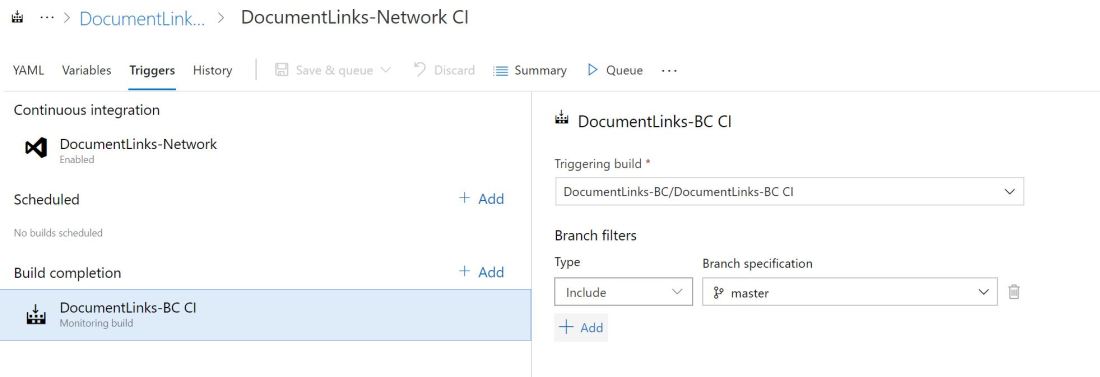
Azure DevOps allows you to trigger a new build on completion of another build. In our scenario we’ve got two apps that are built from two separate Git repositories in the same Azure DevOps project. One is dependent upon the other.

It doesn’t really matter for the purposes of this post what the apps do or why they are split into two but, for the curious, the dependent app provides a little slice of extra functionality for on-prem customers that cannot be supported for SaaS. Consequently the dependency (which has the core functionality supported both for SaaS and on-prem) is developed far more frequently than the dependent app.

Build Triggers.JPG

We want to check that when we push changes to the dependency that the dependent app still works i.e. it compiles, publishes, installs and the tests still run.

You can add a “Build Completion” trigger to pipeline for the dependent app. This defines that when the dependency app is built (filtered by branch) that a build for the dependency kicks off.

That way if we’ve inadvertently made some breaking change we gives ourselves a chance to catch it before our customers do.

Limitations

Currently the triggering and to-be-triggered build pipelines must be in the same Azure DevOps project – which is a shame. I’d love to be able to trigger builds across different projects in the same organisation. No doubt this would be possible to achieve through the API – maybe I’ll attempt it some day – but I’d rather this was supported in the UI.

An Approach to Package Management in Dynamics 365 Business Central

TL;DL

We use PowerShell to call the Azure DevOps API and retrieve Build Artefacts from the last successful build of the repository/repositories that we’re dependent on.

Background

Over the last few years I’ve moved into a role where I’m managing a development team more than I’m writing code myself. I’ve spent a lot of that time looking at tools and practices in the broader software development community. After all, whether you’re writing C/AL, AL, PowerShell or JavaScript it’s all code and it’s unlikely that we’ll face any challenges that haven’t already been faced in one way or another in a different setting.

In that time we’ve introduced:

Package Management

The next thing to talk about is package management. I’ve written about the benefits of trying to avoid dependencies between your apps before (see here). However, if app A relies on app B and you cannot foresee ever deploying A without B then you have a dependency. There is no point trying to code your way round the problems that avoiding the dependency will create.

Accepting that your app has one or more dependencies – and most of our apps have at least one – opens up a bunch of questions and presents some interesting challenges.

Most obviously you need to know, where can I get the .app files for the apps that I am dependent on? Is it at least the minimum version required by my app? Is this the correct app for the version of the Dynamics NAV / Dynamics 365 Business Central that I am developing against? Are the apps that I depend on themselves dependent on other apps? If so, where do I get those from? Is there another layer of dependencies below that? Is it really turtles all the way down?

These are the sorts of questions that you don’t want to have to worry about when you are setting up an environment to develop in. Docker gives us a slick way to quickly create disposable development and testing environments. We don’t want to burn all the time that Docker saves us searching for, publishing and installing app files before we can start work.

This is what a package manager is for. The developer just needs to declare what their app depends on and leave the package manager to retrieve and install the appropriate packages.

The Goal

Why are we talking about this? What are we trying to achieve?

We want to keep the maintenance of all apps separate. When writing app A I shouldn’t need to know or care about the development of app B beyond my use of its API. I just need to know:

  • The minimum version that includes the functionality that I need – this will go into my app.json file
  • I can acquire that, or a later, version of the app from somewhere as and when I need it

I want to be able to specify my dependencies and with the minimum of fuss download and install those apps into my Docker container.

We’ve got a PowerShell command to do just that.

Get-ALDependencies -Container BCOnPrem -Install

There are a few jigsaw pieces we need to gather before we can start putting it all together.

Locating the Apps

We need somewhere to store the latest version of the apps that we might depend upon. There is usually some central, public repository where the packages are hosted – think of the PowerShell Gallery or Docker Hub for example.

We don’t have an equivalent repository for AL apps. AppSource performs that function for Business Central SaaS but that’s not much use to us while we are developing or if the apps we need aren’t on AppSource. We’re going to need to set something up ourselves.

You could just use a network folder. Or maybe SharePoint. Or some custom web service that you created. Our choice is Azure DevOps build artefacts. For a few reasons:

  • We’ve already got all of our AL code going through build pipelines anyway. The build creates the .app files, digitally signs them and stores them as build artefacts
  • The artefacts are only stored if all the tests ran successfully which ought to give us more confidence relying on them
  • The build automatically increments the app version so it should always be clear which version of the app is later and we shouldn’t get caught in app version purgatory when upgrading an app that we’re dependent on
  • We’re already making use of Azure DevOp’s REST API for loads of other stuff – it was easy to add some commands to retrieve the build artefacts (hence my earlier post on getting started with the API)

Identifying the Repository

There is a challenge here. In the app.json file we identify dependencies by app name, id and publisher. To find a build – and its artefacts – we need to know the project and repository name in Azure DevOps.

Seeing as we can’t add extra details into the app.json file itself we hold these details in a separate json file – environment.json. This file can have an array of dependency objects with a:

  • name – which should match the name of the dependency in the app.json file
  • project – the Azure DevOps project to to find this app in
  • repo – the Git repository in that project to find this app in

Once we know the right repository we can use the Azure DevOps API to find the most recent successful build and download its artefacts.

I’m aware that we could use Azure DevOps to create proper releases, rather than downloading apps that are still in development. We probably should – maybe I’ll come back and update this post some day. For now, we find that using the artefacts from builds is fine for the two main purposes we use them: creating local development environments and creating a Docker container as part of a build. We have a separate, manual process for uploading new released versions to SharePoint for now.

The Code

So much for the theory, let’s look at some code. In brief we:

  1. Read app.json and iterate through the dependencies
  2. For each dependency, find the corresponding entry in the environment.json file and read the project and repo for that dependency
  3. Download the app from the last successful build for that repo
  4. Acquire the app.json of the dependency
  5. Repeat steps 2-5 recursively for each branch of the dependency tree
  6. Optionally publish and install the apps that have been found (starting at the bottom of the tree and working up)

A few notes about the code:

  • It’s not all here – particularly the definition of Invoke-TFSAPI. That is just a wrapper for the Invoke-WebRequest command which adds the authentication headers (as previously described)
  • These functions are split across different files and grouped into a module, I’ve bundled them into a single file here for ease

(The PowerShell is hosted here if you can’t see it embedded below: https://gist.github.com/jimmymcp/37c6f9a9981b6f503a6fecb905b03672)


function Get-ALDependencies {
Param(
[Parameter(Mandatory=$false)]
[string]$SourcePath = (Get-Location),
[Parameter(MAndatory=$false)]
[string]$ContainerName = (Split-Path (Get-Location) -Leaf),
[Parameter(Mandatory=$false)]
[switch]$Install
)
if (!([IO.Directory]::Exists((Join-Path $SourcePath '.alpackages')))) {
Create-EmptyDirectory (Join-Path $SourcePath '.alpackages')
}
$AppJson = ConvertFrom-Json (Get-Content (Join-Path $SourcePath 'app.json') -Raw)
Get-ALDependenciesFromAppJson -AppJson $AppJson -SourcePath $SourcePath -ContainerName $ContainerName -Install:$Install
}
function Get-ALDependenciesFromAppJson {
Param(
[Parameter(Mandatory=$true)]
$AppJson,
[Parameter(Mandatory=$false)]
[string]$SourcePath = (Get-Location),
[Parameter(Mandatory=$false)]
[string]$RepositoryName,
[Parameter(Mandatory=$false)]
[string]$ContainerName,
[Parameter(Mandatory=$false)]
[switch]$Install
)
foreach ($Dependency in $AppJson.dependencies) {
$EnvDependency = Get-DependencyFromEnvironment -SourcePath $SourcePath -Name $Dependency.name
$Apps = Get-AppFromLastSuccessfulBuild -ProjectName $EnvDependency.project -RepositoryName $EnvDependency.repo
$DependencyAppJson = Get-AppJsonForProjectAndRepo -ProjectName $EnvDependency.project -RepositoryName $EnvDependency.repo
Get-ALDependenciesFromAppJson -AppJson $DependencyAppJson -SourcePath $SourcePath -RepositoryName $RepositoryName -ContainerName $ContainerName -Install:$Install
foreach ($App in $Apps) {
if (!$App.FullName.Contains('Tests')) {
Copy-Item $App.FullName (Join-Path (Join-Path $SourcePath '.alpackages') $App.Name)
if ($Install.IsPresent) {
try {
Publish-NavContainerApp -containerName $ContainerName -appFile $App.FullName -sync -install
}
catch {
if (!($_.Exception.Message.Contains('already published'))) {
throw $_.Exception.Message
}
}
}
}
}
}
}
function Get-AppJsonForProjectAndRepo {
Param(
[Parameter(Mandatory=$true)]
[string]$ProjectName,
[Parameter(Mandatory=$false)]
[string]$RepositoryName
)
$VSTSProjectName = (Get-VSTSProjects | where name -like ('*{0}*' -f $ProjectName)).name
$AppContent = Invoke-TFSAPI ('{0}{1}/_apis/git/repositories/{2}/items?path=app.json' -f (Get-TFSCollectionURL), $VSTSProjectName, (Get-RepositoryId -ProjectName $VSTSProjectName -RepositoryName $RepositoryName)) -GetContents
$AppJson = ConvertFrom-Json $AppContent
$AppJson
}
function Get-DependencyFromEnvironment {
Param(
[Parameter(Mandatory=$true)]
[string]$SourcePath,
[Parameter(Mandatory=$true)]
[string]$Name
)
Get-EnvironmentKeyValue -SourcePath $SourcePath -KeyName 'dependencies' | where name -eq $Name
}
function Get-EnvironmentKeyValue {
Param(
[Parameter(Mandatory=$false)]
[string]$SourcePath = (Get-Location),
[Parameter(Mandatory=$true)]
[string]$KeyName
)
if (!(Test-Path (Join-Path $SourcePath 'environment.json'))) {
return ''
}
$JsonContent = Get-Content (Join-Path $SourcePath 'environment.json') -Raw
$Json = ConvertFrom-Json $JsonContent
$Json.PSObject.Properties.Item($KeyName).Value
}
function Get-VSTSProjects {
(Invoke-TFSAPI -Url ('{0}_apis/projects?$top=1000' -f (Get-TFSCollectionURL))).value
}
function Get-RepositoryId {
Param(
[Parameter(Mandatory=$true)]
[string]$ProjectName,
[Parameter(Mandatory=$false)]
[string]$RepositoryName
)
$Repos = Invoke-TFSAPI ('{0}{1}/_apis/git/repositories' -f (Get-TFSCollectionURL), $ProjectName)
if ($RepositoryName -ne '') {
$Id = ($Repos.value | where name -like ('*{0}*' -f $RepositoryName)).id
}
else {
$Id = $Repos.value.item(0).id
}
if ($Id -eq '' -or $Id -eq $null) {
$Id = Get-RepositoryId -ProjectName $ProjectName -RepositoryName ''
}
$Id
}

Working with Version Numbers in Dynamics Business Central / NAV

Specifically I’m talking about assigning version numbers to your own code and manipulating those versions in CAL / AL and PowerShell.

Version Numbering

There are lots of different systems for assigning a version number to some code. Some incorporate the date or the current year and day number within the year. Loads of background reading here if you’re interested.

The system we typically follow is:

Version number = a.b.c.d where:

  • a = major version – this is only incremented for a major refactoring or complete rewrite of the software
  • b = minor version – incremented when a significant new feature is implemented
  • c = fix – incremented for small changes and bug fixes
  • d = build – set to the ID of the build that created it in Azure DevOps

This system isn’t perfect and we don’t always follow it exactly as written. The line between what is just a fix and what is a new feature is a little blurry. We don’t run CAL code through our DevOps build process so they don’t get a build ID like AL apps do. Hit the comments section and tell me how and why you version differently.

Regardless, the important thing is you give some consideration to versioning. It is especially important that two different copies of your code must not go out to customers having the same version number. This is especially true for AL apps. If you want to publish an updated version of an app it must have a higher version number than the one you are replacing.

Automation

There are several situations where we need to work with version numbers in code and in scripts.

  • In the build process – reading the current version from app.json and setting the last element to equal the build ID
  • In our PowerShell script that creates a new navx package from CAL code (yes, we use v1 extensions. Not now, let’s go into that some other time)
  • In upgrade code – what was the previous version of the app? Was it higher or lower than a given version?

If you are considering, like we used to, just treating version numbers as strings…don’t. Think about it:

Treated as versions 1.10.0 is greater than 1.9.0 but when treated as strings it isn’t. That led us to split the versions into two arrays and compare each element. It worked, but it was convoluted. And completely unnecessary.

Some bright spark in our team wondered why we can’t just use .Net’s version type. We can.

CAL

Use a DotNet variable of type Version. Construct it with the version number string. NAVAPP.GETARCHIVEVERSION returns a string that can be used.

You can use the properties of the variable to access the individual elements of the version and its methods to compare to another string (less than, less than or equal to, greater than, greater than or equal to).

Version : DotNet System.Version.'mscorlib, Version=4.0.0.0, Culture=neutral, PublicKeyToken=b77a5c561934e089'
Version2 : DotNet System.Version.'mscorlib, Version=4.0.0.0, Culture=neutral, PublicKeyToken=b77a5c561934e089'

Version.Version('1.10.0');
Version2.Version(NAVAPP.GETARCHIVEVERSION);

IF (Version2.op_LessThan(Version) THEN BEGIN
  //some upgrade code that must be run when coming from an older version than 1.10.0
END;

PowerShell

Declare a variable of a given DotNet type using square brackets. Create a new version with new, Parse or TryParse. The latter expects a version variable passed by reference and returns a Boolean indicating whether a value could be assigned.

Access the elements of the version through the properties of the variable.

C:\> $Version1 = [Version]::new(1,10,0)
>> $Version2 = [Version]::new('1.9.0')
>> $Version1.CompareTo($Version2)
1

C:\> $Version = [Version]::new(1,10,0)
>> $Version.Minor
10

C:\> $Version = [Version]::new()
>> [Version]::TryParse('monkey',[ref]$Version)
False

AL

AL has a native Version datatype. As above, create a new version either from its elements or from a string. NavApp.GetArchiveVersion returns a string that can be used (for migration from v1).

To get the version of the current module (app) or of another app use NavApp.GetCurrentModuleInfo or NavApp.GetModuleInfo.

var
  Ver : Version;
  Ver2 : Version;
  DataVer : Version;
  AppVer : Version;
  ModInfo : ModuleInfo;
  ModInfo2 : ModuleInfo;
begin
  Ver := Version.Create(1,10,0);
  Ver2 := Version.Create(NavApp.GetArchiveVersion());

  if Ver > Ver2 then begin
    //some upgrade code
  end;

  //version of the current app
  NavApp.GetCurrentModuleInfo(ModInfo);
  DataVer := ModInfo.DataVersion();
  AppVer := ModInfo.AppVersion();

  //app version of the first dependency
  NavApp.GetModuleInfo(ModInfo.Dependencies().Get(1).Id(),ModInfo2); //dependencies is 1 based, not 0 based
  AppVer := ModInfo2.AppVersion();
end;