Recently I got stung by this. As a rule we keep the application version in app.json low (maybe one or two versions behind the latest) so that it can be installed into older versions of Business Central. Of course this is a balance – we don’t want to have to support lots of prior versions and old functionality which is becoming obsolete (like the Invoice Posting Buffer redesign, or the new pricing experience which has been available but not enabled by default for years). Having to support multiple Business Central features which may or may not be enabled is not fun.
On the other hand, Microsoft are considering increasing the length of the upgrade window so it is more likely that we are going to want to install the latest versions of our apps into customers who are not on the latest version of Business Central.
Runtime Versions
But that wasn’t really the point of the post. The point is, there are effectively two properties in app.json which define the minimum version of Business Central required by your app.
application: the obvious one. We mostly have this set a major prior to the latest release unless there are specific reasons to require the latest
runtime: the version of the AL runtime that you are using in the app. When new features are added to the AL language (like ternary operators – who knew a question mark could provoke such passionate arguments?), as, is, and this keywords, or multiple extensions of the same object in the same project
I didn’t want to get caught out by this again so I added a step into our pipeline to catch it. The rule I’ve gone with is, the application version must be at least 11 major version numbers higher than the runtime version. If it isn’t then fail the build. In that case we should either make a conscious decision to raise the application version or else find a way to write the code that doesn’t require raising the runtime version. Either way, we should make a decision, not sleep walk into raising our required application version.
Why 11? This is because runtime 1.0 was released with Business Central 12.0. Each subsequent major release of Business Central has come with a new major release of the runtime (with a handful of runtime releases with minor BC releases thrown in for good measure).
The step is pretty simple ($appJsonPath is a variable which has been set earlier in the pipeline).
steps:
  - pwsh: |
      $appJson = Get-Content $(appJsonPath) -Raw | ConvertFrom-Json
      $runtimeVersion = [Version]::Parse($appJson.runtime)
      $applicationVersion = [Version]::Parse($appJson.application)

      if ($applicationVersion -lt [version]::new($runtimeVersion.Major + 11, $runtimeVersion.Minor)) {
        Write-Host -ForegroundColor Red "##vso[task.logissue type=error;]Runtime version ($runtimeVersion) is not compatible with application version ($applicationVersion)."
        throw "Runtime version ($runtimeVersion) is not compatible with application version ($applicationVersion)."
      }
    displayName: Test runtime version
For a while now AL Test Runner has been able to download the code coverage details after running your tests, output a summary of the objects that were hit with some stats and then highlight the lines which were hit in the previous test run or the last time you ran all the tests. More in the docs.
Recently, VS Code has added an API for test extensions to feed data into and some UI to show the coverage. It’s pretty cool.
Test Coverage
The first thing you’ll notice is this “Test Coverage” panel which is displayed after the tests have run. It displays a tree of the ojbects which have been hit by the run and the percentage coverage (in statement coverage terms).
If you click on a file in the tree it will open the file in the editor and you will see lines which were hit highlighted in the gutter.
In fact, these highlights will continue to be shown as you navigate around your source code. I’m leaving the “Code Coverage: Off/Previous/All” item in the status bar as this highlights each whole line and is much easier to see if you want to zoom out and get an impression of coverage of the whole file.
Coverage from Previous Runs
Coverage from previous test runs is stored and can be accessed from the Test Results pane (usually shown at the bottom of the screen). It might be useful to switch between test coverage results for test runs to see how to coverage % has changed over time (with the usual caveat about not using code coverage as a target).
The decorations in the gutter to indicate which lines have been covered in the current file are only shown when the latest test coverage is being displayed. That makes sense because the code coverage detail is all based on line numbers. Once you’ve made some changes to a file those line numbers are obsolete.
This is a feature that has been in AL Test Runner for a months now but I haven’t got round to blogging about it. I haven’t done much blogging or work on AL Test Runner for a while now. I started a new job at the start of the year and had more important stuff keeping me occupied, but Johannes (https://github.com/jwikman) has prompted me into some action with some contributions recently – thanks very much for that 🥳
Scenario
My original scenario was that we had some poorly performing code. Complex code. Complex code I hadn’t been involved with much before. Complex code that would be easy for me to break functionally, while trying to improve the performance.
My first task was to surround the code with some integration tests. I find this an effective way to learn some existing code. You have to learn how to construct the GIVENs – what is the data structure and what setup is required for each test? It also gives you an easy way to step through the code and see what’s going on when certain processes are run. Crucially it also gave me some confidence that I wasn’t completely screwing up the app that I was working on while I was changing it.
Comparing Performance
OK, so I’ve got some tests to validate the functional behaviour before and after my changes, but what about performance? We have the Performance Toolkit, but I think that is less about the performance of a single process and more about concurrency. The obvious choice is to use the Performance Profiler.
I wanted to leave the existing code paths intact and just use a setup field as a rudimentary feature flag to switch between the old code and the new code. But, I didn’t want to be opening the client to run the performance profiler page or initialize and download snapshot profiles in between each test. I wondered if it was possible to could automate capturing a profile and downloading it to the workspace somehow.
It was 🙂
Setup
There is a new setting “Enable Performance Profiler” which defaults to true. This uses some new functions in the Test Runner Service app. With each test run the performance profile is captured and downloaded to the .altestrunner folder in your test project.
This should all be handled automatically. The Test Runner Service app should be downloaded when required and the serviceUrl in the config file set automatically. Check the docs for the required setup if not though.
Use
There is a new icon in the status bar which will open the performance profile viewer with the latest trace.
With this I could run two tests with the old and the new and compare the results side by side. If you want to do that just take a copy of the first trace file as it will be overwritten by the second test.
The trace, of course, has other benefits too. It is much easier to see the whole callstack and use the links on the right hand side to jump straight into the code. This also gives the potential for other features. I could maybe do something that allows you to choose two tests to run and download separate traces for them all in one action? Or read through the trace file to update the test coverage map? Let me know whether either of those sounds interesting or if you have other ideas or issues.
Sometimes it would be useful to know how your code has been reached. For example, how and why is this sales line being inserted, or this sales order released? You might want to react differently in your code depending on the situation.
In my case I wanted to know if my code has been reached because a configuration package is currently being applied. In the end we decided this wasn’t needed in the product but I thought it was interesting enough to share anyway.
It might be enough just to know which field the user was validating when your code was reached, in which case you can just check CurrFieldNo.
Consider how you are going to write tests for this though. I try to avoid using TestPage variables in tests so you need some other way to simulate the user validating the field on the page. It isn’t big or clever but you can have a method to set CurrFieldNo.
internal procedure SetCurrFieldNo(FieldNo: Integer)
begin
    CurrFieldNo := FieldNo;
end;

----

[Test]
procedure TestingSomethingOrOther()
var
    SalesLine: Record "Sales Line";
begin
    ...
    SalesLine.SetCurrFieldNo(SalesLine.FieldNo("No."));
    SalesLine.Validate("No.", Item."No.");
    ...
end;
RunTrigger
If you extend table triggers with table extensions they will only be called with Insert/Modify/Delete(true);
If you subscribe to the OnBefore/OnAfter Insert/Modify/Delete events in a codeunit then pay attention to the RunTrigger parameter.
Don’t forget to also pay attention to whether the record is temporary with Rec.IsTemporary(); You probably want your code to behave differently depending on whether the record is temporary or not.
Alternate Code Paths or Events
Sometimes the base app (or other app that you are extending) might have anticipated that you need to be able to distinguish between certain scenarios.
For example, Release Sales Document might be called by a user clicking on the Release action on the Sales Order page or it might be called deep in the warehouse posting routine. Those are very different contexts and you might need to react differently depending on which it is.
In this case, Release Sales Document has the concept of a “manual” release for when it has been invoked by the user. There are separate events you can subscribe to depending on if you only want to react to a manual release or all releases.
I’m not keen on this design in the base app – but that ship has long since sailed, carrying approvals and pre-payments with it.
Investigate the Callstack
We could capture the current callstack, see where we’ve come from and choose how to react.
You might consider creating a new object where you can save some state to retrieve later. Set a boolean flag to true at the start of the process and then retrieve the value of that boolean later on.
Good idea, but where are we going to save that value?
SingleInstance Codeunit
A SingleInstance codeunit might be an obvious place to start. Create a global variable in that codeunit, set its value at the start of the process (maybe with an event subscription) and then check its value when you need it.
At face value this looks like a good and easy solution but quickly becomes quite difficult.
You have to clear the state of the codeunit at some point otherwise your flag will never get set to false again (until the user logs off/switches company).
If there is an appropriate OnAfter event then surely we can just subscribe to that and unset the flag? Yes, but what if that event never gets called? What if there is an error midway through the process? Your flag remains set. That could lead to some problems.
Flag Record
OK, could we use a field in a table as the flag instead? Write into that table at the start of the process and delete the record at the end. If an error occurs then the record changes will be rolled back with everything else. Possibly, but consider:
Temporary records are not rolled back when an error occurs (they are only in memory, not part of the database transaction). That can be useful (e.g. that is how preview posting collects the ledger entries) but not if you are relying on it to unset your flag if an error occurs
If you are going to use a real (non-temporary) table to do this you don’t want it to become a performance bottleneck. Your record will be locked until the transaction is committed
Presumably you want a row per user, but the same user can be logged in multiple times so you probably want a row per session
None of this is insurmountable, but it isn’t elegant either.
Raise a Flag With a Manually Bound Codeunit
Ideally we are looking for a flag that:
will not persist after the process we are interested has ended or an error has occurred
doesn’t require any manual clean up e.g. subscribing to an OnAfter event
doesn’t get involved with the database transaction, need to lock tables or rollback
A manually bound codeunit might be what we’re looking for.
I’ve created two new codeunits:
Apply Config. Watcher – this has a public method which we can use to ask if a configuration is currently being applied. We might call this from OnInsert of a table or field validation, for example. It throws an (internal) event to determine whether a config package is being applied or not
Apply Config. Flag – this is a manually bound codeunit which just subscribers to the event and sets the boolean to true
Now we need to make sure that an instance of our codeunit is bound when a configuration package is being applied and is not bound when it isn’t.
One way to do this is to keep a bound instance of the codeunit as a global variable inside a record variable. As long as the record variable is in scope, so is our flag codeunit. Now the tricky part, we need an event which passes an instance of a record variable (i.e. passes it by var) which we can store our codeunit in.
The standard Config. Package Management codeunit has an event that we can use, OnBeforeApplyPackageRecords. This event includes the ConfigPackageRecord variable, passed by var. I’ve extended that table with a RaiseApplyConfigFlag() method.
This table extension adds our ApplyConfigFlag codeunit as a global variable and binds its subscriptions. This way, as long as this Config. Package Record variable is in scope the Apply Config. Watcher codeunit will return that we are applying a configuration package.
As soon as that variable is out of scope (when the Config. Package Management codeunit has finished with it or an error has occurred) then Apply Config. Watcher will return false.
Conclusion
There may be other contexts that you want to handle differently – releasing a sales document, posting a warehouse shipment or some third party process. If there is:
an event early in the process
which passes a record variable by var
which remains in scope for the duration of the process
then this may be an option for identifying that context without messing around with single instance codeunits or records to store user state.
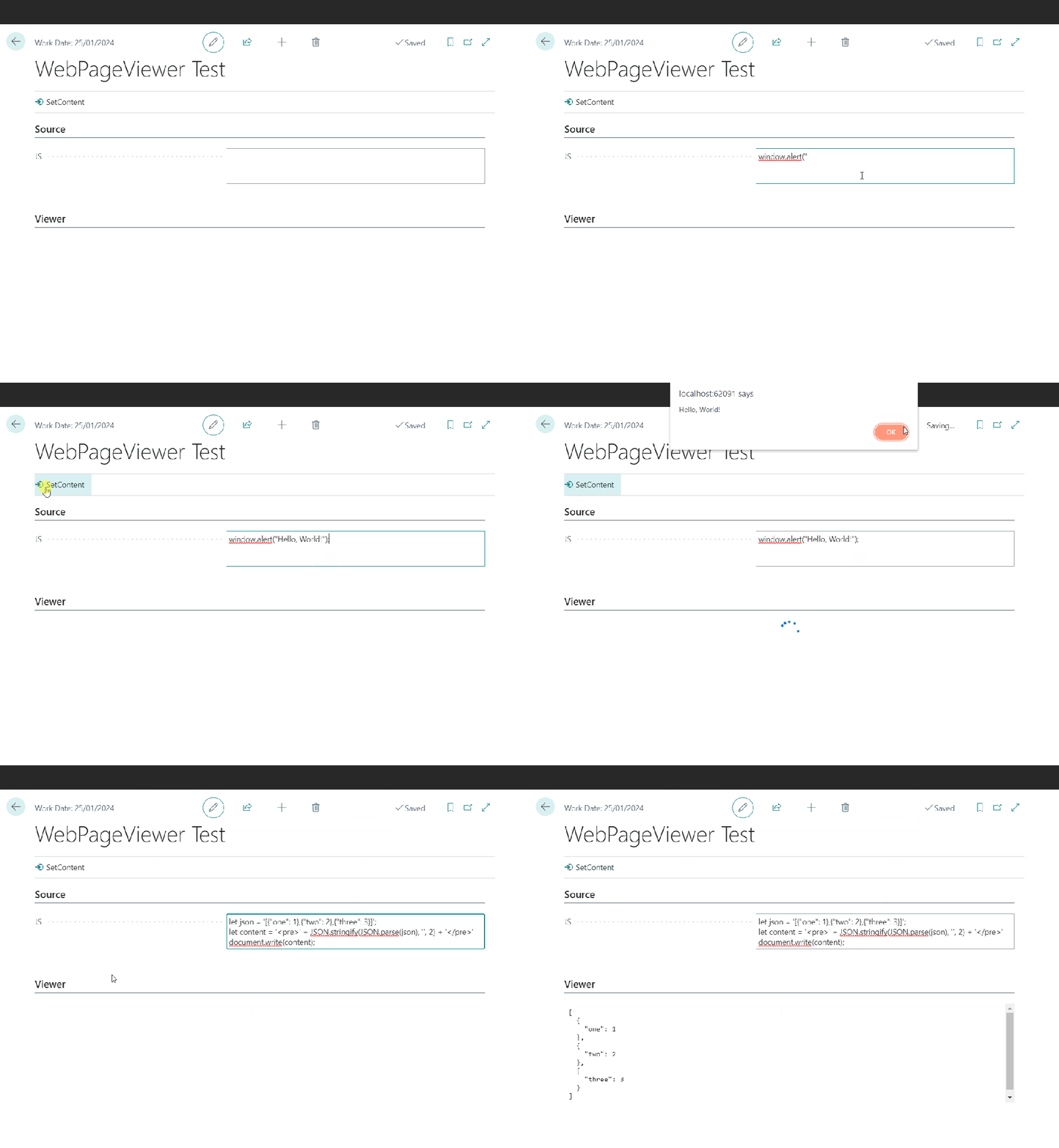
The WebPageViewer add-on has an overload to accept some JavaScript. You can use that to execute arbitrary script locally. WebPageViewer.SetContent(HTML: Text; JavaScript: Text);
Executing JavaScript with WebPageViewer
JSON Formatting
This post starts with me wanting to format some JSON with line breaks for the user to read. It’s the response from an Azure Function which integrates with a local SQL server (interesting subject, maybe for another time). The result from SQL server is serialized into a (potentially very long) JSON string and this is the string that I want to present in a more human-readable format.
Sometimes I converge on a solution through a series of ideas, each of which slightly less bad than the previous. This was one of those times. If you don’t care about the train of thought then the solution I settled on was to use the JavaScript parameter of the WebPageViewer’s SetContent method.
If you’re still here then here are the stations that the train of thought pulled into, starting with the worst.
Requirement
Have some control on my page for the user to view the JSON returned from the Azure Function, formatted with line breaks.
1. Format at Source
Why not just add the line breaks when I am serializing the results in the C# of my Azure Functions? That way I don’t need to change anything in AL.
No, that’s dumb. That would make every response from the function larger than it needs to be just for the rare occasions when a human might want to read it. Don’t do that.
2. Call an Azure Function to Format the Result
I could have a second Azure Function to accept the unformatted result and return the formatted version. I could have a Function App which runs node.js and return the result in a couple of lines of code.
Wait, that’s absurd. Call another Azure Function just to execute two lines of JavaScript? And store the Uri for that function somewhere? In a setup table? Hard-coded? In a key vault? Seems somewhat over-engineered.
3. Create a User Control
Hang on. I’m being thick. We can execute whatever JavaScript we want in a user control. I can create a control with a textarea, or just a div, create a function to accept the unformatted JSON, format it and set the content of the div. No need to send the JSON outside of BC.
Closer, and if you want more control over how the JSON looks on screen probably the best bet. But, is it really necessary to create a user control just to execute some JavaScript? Still seems like too much work for what is only a very simple problem.
If you pass some script it will be executed when the page control is loaded. Perfect for what I need. I can just use the JSON.parse and JSON.stringify functions to read and then re-format my JSON text. I’m also wrapping it in pre tags and removing any single quotes in the text to format (because they will screw the JavaScript and I can’t be bothered to handle them properly).
The AL code ends up looks like this:
local procedure SetResult(NewResult: Text)
var
    JS: Text;
begin
    NewResult := NewResult.Replace('''', '');
    JS := StrSubstNo('document.write(''<pre>'' + JSON.stringify(JSON.parse(''%1''), '''', 2) + ''</pre>'');', NewResult);
    CurrPage.ResultsCtrl.SetContent('', JS);
end;
If you’re not using 26 single quotes in three lines of code then you’re not doing it right 😉




 James Pearson