Another Look at App Integration in Business Central – Part 2

Recap

See here for part 1 of this series. The challenge that we are trying to solve is to allow Business Central apps to call each other’s functionality without creating a dependency.

⚠️ Reminder: only do this when you cannot create a dependency between the two apps. If a dependency is acceptable then that is the way that you should solve this problem.

Scenario

My scenario was having two apps: Web Shop Integration and Shipping Agent Integration. We cannot afford to create a dependency between the two – we must be able to sell and deploy them independently of one another to our customers. However, if we do deploy both apps into an environment then they must interact with one another.

I finished the previous post with the suggestion that an interface in a shared dependency is a good way to address this requirement.

Example

There is some sample code in this repo: https://github.com/jimmymcp/app-integration-demo. For ease I’ve put the functionality of all three layers into the same workspace, but for real these apps might exist in different repos.

Overview

There are three apps in my example:

  • App Integration
  • Shipping Agent Integration
  • Web Shop Integration

Let’s think about what each of these apps is responsible for. In the previous post, one of my design goals was the separation of concerns. Each app should have a clear set of responsibilities which does not overlap with the responsibilities of another app. You might know this as the single responsibility principle.

App Integration

This app is going to:

  • Hold the interface for shipping agent integration (more of that below)
  • Allow another app to register its implementation of that interface
  • Allow another app to check whether the shipping agent integration is implemented, and specifically which version of that interface is implemented

Shipping Agent Integration

Is going to:

  • Implement the shipping agent integration interface which is defined in the app integration layer i.e. provide the business logic to calculate the shipping charges for a given sales order
  • Register its implementation with the app integration layer

Web Shop Integration

Is going to:

  • Check whether the shipping agent integration interface has is implemented
  • If so, call the method to calculate the shipping charges for a sales order

Interface(s)

IShippingAgentIntegration

The key thing here is the Shipping Agent Interface. This is a contract between the two apps. If there is an implementation of shipping agent integration then this is the functionality that it must provide.

This is a very simple example of what that might look like. A single method which takes a temporary sales header and set of sales lines and returns a decimal.

namespace JamesPearson.AppIntegration;
using Microsoft.Sales.Document;

interface "IShippingAgentIntegration1.0"
{
    procedure CalculateShippingCharge(var TempSalesHeader: Record "Sales Header" temporary; var TempSalesLine: Record "Sales Line" temporary): Decimal
}

That gives the Web Shop Integration app all the information that it needs. It doesn’t know or care how that functionality is provided, only that it is. Equally, Shipping Agent Integration doesn’t need to know anything about the app(s) which are calling that functionality, only that they will provide the specified parameters and handle the return values.

You’ll notice that the interface name includes a version no. We are going to need that when we need to add functionality to the contract. More about that in a future post.

IApp

In addition to the Shipping Agent Integration interface there is also an IApp interface. This interface holds methods which need to be implemented by all apps which provide functionality to other apps through the app integration layer.

The only thing that this interface defines is a method to return the version of the interface which is implemented.

namespace JamesPearson.AppIntegration;

interface IApp
{
    procedure GetVersion(): Version
}

App Enum

Next, I’ve got an enum which lists the apps which expose functionality through the app integration layer. For now, this is only the Shipping Agent Integration app.

namespace JamesPearson.AppIntegration;

enum 50300 App
{
    Extensible = true;
    
    value(0; ShippingIntegration)
    {
        Caption = 'Shipping Integration';
    }
}

This enum is going to be used by both Web Shop Integration to check whether an interface implementation exists and by Shipping Agent Integration to register an implementation.

Flow

The flow between the apps is going to something like this:

  1. The Shipping Integration app registers an implementation of the IShippingAgentIntegration interface OnAfterLogin with the App Integration app
  2. The App Integration app stores the implementation in a dictionary in memory
  3. The Web Integration app will ask the App Integration app whether there is an implementation of the IShippingAgentIntegration interface
  4. If so, the Web Integration app will ask for the implementation so that it can call its method to calculate the shipping charges

Implementation

Having defined the IShippingInterface interface in the App Integration layer the Shipping Agent Integration app now needs to implement it and register its implementation. That might look something like this:

namespace JamesPearson.ShippingAgentIntegration;
using JamesPearson.AppIntegration;
using Microsoft.Sales.Document;
using System.Environment.Configuration;

codeunit 50400 "Shipping Agent Integration" implements IApp, "IShippingAgentIntegration1.0"
{
    procedure GetVersion(): Version
    begin
        exit(Version.Create(1, 0, 0, 0));
    end;

    procedure CalculateShippingCharge(var TempSalesHeader: Record "Sales Header" temporary; var TempSalesLine: Record "Sales Line" temporary): Decimal
    begin
        //business logic for calculating shipping charges
        Randomize(Time() - 0T);
        exit(Random(10));
    end;

    [EventSubscriber(ObjectType::Codeunit, Codeunit::"System Initialization", OnAfterLogin, '', false, false)]
    local procedure "System Initialization_OnAfterLogin"()
    var
        AppIntegration: Codeunit "App Integration";
    begin
        AppIntegration.Register(Enum::App::ShippingIntegration, this);
    end;
}

This codeunit implements both the IApp and IShippingIntegration interfaces – that is going to be important in a minute. It returns the version of the IShippingIntegration interface which it is implementing from GetVersion and also implements the shipping charge logic in CalcShippingCharges.

It also has a subscription to the OnAfterLogin event to register its implementation with the App Integration layer, passing a copy of itself with this.

Registering the Implementation

Over to the App Integration layer to store the implementation of the interface that has been passed to it. The App Integration layer has a dictionary of [Enum App, Interface IApp] (the ability to use interfaces in collections has been added recently). This codeunit is SingleInstance to keep the interface implementations in memory for when we need to call them.

namespace JamesPearson.AppIntegration;

codeunit 50300 "App Integration"
{
    SingleInstance = true;

    var
        Apps: Dictionary of [Enum App, Interface IApp];

    procedure Register(App: Enum App; IApp: Interface IApp)
    begin
        if Apps.ContainsKey(App) then
            Apps.Set(App, IApp)
        else
            Apps.Add(App, IApp);
    end;

    procedure GetInterfaceVersion(App: Enum App): Version
    begin
        if not HasImplementation(App) then
            exit(Version.Create(0, 0, 0, 0));

        exit(Apps.Get(App).GetVersion());
    end;

    procedure HasImplementation(App: Enum App): Boolean
    begin
        exit(Apps.ContainsKey(App));
    end;

    procedure "ShippingAgentIntegration1.0"(): Interface "IShippingAgentIntegration1.0"
    begin
        exit(Apps.Get(App::ShippingIntegration) as "IShippingAgentIntegration1.0");
    end;
}

The code should be fairly self-explanatory but:

  • Register allows another app to register an implementation of the interface associated with a particular app in the App enum
  • HasImplementation allows another app to check whether we have an implementation of a certain app’s interface
  • GetInterfaceVersion allows another app to check which version of an app’s interface has been implemented
  • IShippingAgentIntegration1.0 is specifically for the Shipping Agent Integration app and returns the implementation of that interface which it has in the Apps dictionary (casting the interface to the specific type with as)

Consuming the Implementation

All that is left is for the consuming app to test whether we have an implementation of a certain app’s interface and call its functionality if we have.

This is a codeunit in the Web Integration codeunit which is responsible for calculating shipping charges for the order. If Shipping Agent Integration is also installed then we need to ask it to calculate the charges. If it isn’t then we have some alternative logic.

namespace JamesPeason.WebShopIntegration;
using JamesPearson.AppIntegration;
using Microsoft.Sales.Document;

codeunit 50350 "Calc. Shipping Charges"
{
    procedure CalcShippingCharge(var TempSalesHeader: Record "Sales Header" temporary; var TempSalesLine: Record "Sales Line" temporary): Decimal
    var
        AppIntegration: Codeunit "App Integration";
    begin
        //if the shipping agent integration interface is implemented then call its method
        if AppIntegration.GetInterfaceVersion(Enum::App::ShippingIntegration) >= Version.Create(1, 0, 0, 0) then
            exit(AppIntegration."ShippingAgentIntegration1.0"().CalculateShippingCharge(TempSalesHeader, TempSalesLine));

        //if not then we have some alternative logic to calculate shipping charges
        exit(SomeAlternativeLogic(TempSalesHeader, TempSalesLine));
    end;

    local procedure SomeAlternativeLogic(var TempSalesHeader: Record "Sales Header" temporary; var TempSalesLine: Record "Sales Line" temporary): Decimal
    begin
        //some alternative logic for calculating shipping charges goes here
    end;
}

The Web Integration app asks the App Integration app whether we have at least v1.0 of the Shipping Agent Integration interface. If we do, then it retrieves the implementation and calls

Conclusions

There are few moving parts to support this design, but it achieves the key design goals of allowing the two apps to integrate with one another without requiring a dependency between them.

The interface provides a definite contract of the functionality will be implemented. When we want to change that contract we can create a new version of the interface (in fact, we will have to in order to avoid breaking changes). More of that in another post.

Tip – Access the Clipboard with Business Central

Intro

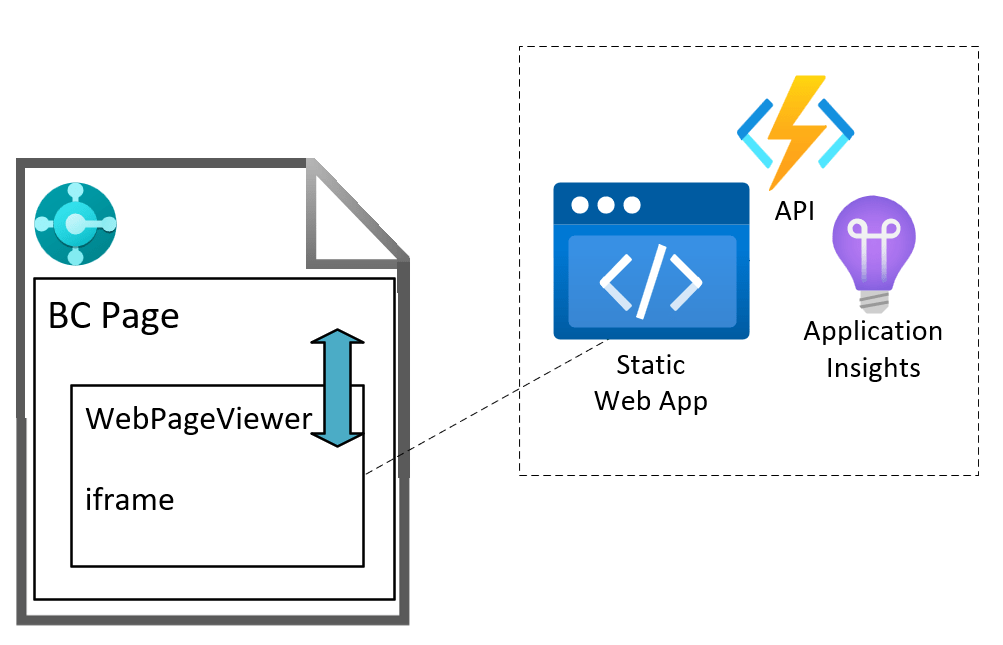
I’ve written before about using the WebPageViewer control add-in to add a little zest et je ne sais quoi to your BC pages. You can set html content like this or use JavaScript to neatly format JSON like this.

Obviously, you have more control over how your page looks and behaves if you write your own control add-in, but for smaller jobs where you just need a little sprinkling of HTML and (your favourite programming language and mine) JavaScript then the WebPageViewer might be just fine.

Clipboard

This time I wanted to access the clipboard. We’re generating a URL that we want users to be able to send. Sure, you can pop the URL into a message and ask the user to copy it – but what if they don’t select the whole link? It’s just not cool.

“Wouldn’t it be nice if we could show the user a little “Copy” button and write the link straight to the clipboard?” (…is not something that The Beach Boys sang about in the 60s but no doubt would have done if Business Central had been around at the time).

Add the content that you want to copy to some HTML control (I’m using a textarea in this case) and add a button which calls a function onclick to copy the text. For some extra UX goodness I’ve added an eventListener to the click event which changes the button’s value to “Copied” and changes the background colo(u)r to a Business Central teal to match the OK button of the page (the page type is StandardDialog).

The interesting bit of the code looks like this (also on GitHub here: https://github.com/jimmymcp/bc-clipboard):

local procedure SetContent()
var
    HTML, JS : Text;
begin
    HTML := @'<textarea id="textToCopy" cols="50" rows="5" style="font-family: Segoe UI;">This is some sample text...

...and here is some more
</textarea>
    <input type="button" value="Copy" onclick="copyToClipboard()" id="copyButton" style="vertical-align: top;" />';

    JS := @'document.getElementById("copyButton").addEventListener("click", () => {
    let copyButton = document.getElementById("copyButton");
    copyButton.value = "Copied";
    copyButton.style.backgroundColor = "#007E87";
    copyButton.style.color = "white"
});

function copyToClipboard() {
    let copyText = document.getElementById("textToCopy");
    copyText.select();
    copyText.setSelectionRange(0, 99999); // For mobile devices
    navigator.clipboard.writeText(copyText.value);
}';

    CurrPage.WebPageViewer.SetContent(HTML, JS);
end;

Insecure Origins Treated as Secure

If you are testing this in a web client you access over http e.g. you likely access a local Docker container without SSL then you will find that this doesn’t work. No obvious error, it just fails to write to the clipboard.

Pop open the browser developer tools and you will see this in the console.

That is because by default the clipboard is not available to sites which are served over http. You can override that behaviour per site with a browser flag.

Open up chrome://flags, edge://flags or however you access your preferred Chromium-based browser flags (I haven’t tested in Firefox, Safari or anything non-Chromium) and search for “Insecure origins treated as secure”. Enable that setting and enter the URL that you access the web client at.

It won’t be necessary to do the same when the web client is served over https.

Additional Details about Extension Settings in Business Central 25.0

Extension Settings

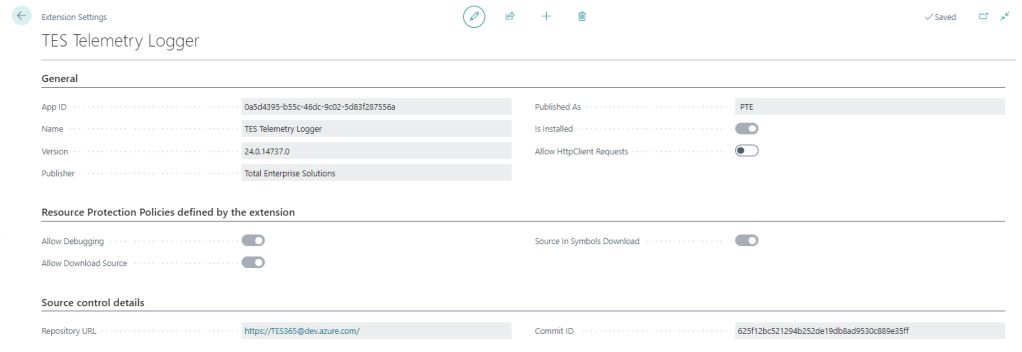
For a long time the only thing additional data you could see on the Extension Settings page was whether to allow Http calls from this extension (the Allow HttpClient Requests checkbox). This page has got some love in BC25.

That setting is still the only thing that you can control, but now you can also see:

Resource Protection Policies

Corresponding to resource exposure policies in app.json (maybe “exposure” sounded a little risqué for the user interface). This indicates whether you can debug, download the source code and whether the source is included when you download the symbols.

That might be useful to know before you create a project to download the symbols and attempt to debug something.

Interestingly, extensions which don’t expose their source code get the red No of shame in the Extension Management list.

Source Control Details

Includes the URL of the repository and the commit hash that the extension was created from. That’s cool – you can link straight from the Extension Settings page to the repo in DevOps / GitHub / wherever your source is. That’s a nice feature either for your own extensions or open source extensions that you are using.

It may be that each time you build an app that you already give it an unambiguous, unique version number (we include the DevOps unique build id in the extension version) but the commit hash is nice to see as well.

How Does it Know?

Where does that information come from? It is included in the NaxManifest file, extract the .app file with 7-Zip and take a look.

<ResourceExposurePolicy AllowDebugging="true" AllowDownloadingSource="true" IncludeSourceInSymbolFile="true" ApplyToDevExtension="false"/>
<KeyVaultUrls/>
<Source RepositoryUrl="https://TES365@dev.azure.com/..." Commit="625f12bc521294b252de19db8ad9530c889e35ff"/>
<Build Timestamp="2024-09-10T12:49:40.2694758Z" CompilerVersion="13.1.16.16524"/>
<AlternateIds/>

How Does That Info Get Populated?

When the app is compiled by alc.exe there are additional switches to set this information. These are some of the switches that you can set when compiling the app.

These switches are not set when you compile the app in VS Code (crack the app file open with 7-Zip and check), but you can set them during the compilation step of your build. If you are using DevOps pipelines you can make use of these built-in variables Build.SourceVersion and Build.Repository.Uri to get the correct values.

&'$(alcPath)' /project:"$(projectPath)" /sourcecommit:"$(Build.SourceVersion)" /sourcerepositoryurl:"$(Build.Repository.Uri)" ... (truncated)

That’s if you roll your own build pipelines. If you use some other tooling (AL-Go for GitHub, ALOps etc.) then the compilation step will be in their code. They may have already implemented this, I don’t know.

Side note: Microsoft want to push us to use 3rd party tooling rather than making our own (e.g. I watched this podcast with Freddy the other day) but personally I still see enough value in having control over the whole DevOps process to justify the small amount of time I spend maintaining and improving it. I’m open to changing that stance one day, but not today.

Testing Compatibility Between Runtime and Application Version in Business Central Builds

Background

Recently I got stung by this. As a rule we keep the application version in app.json low (maybe one or two versions behind the latest) so that it can be installed into older versions of Business Central. Of course this is a balance – we don’t want to have to support lots of prior versions and old functionality which is becoming obsolete (like the Invoice Posting Buffer redesign, or the new pricing experience which has been available but not enabled by default for years). Having to support multiple Business Central features which may or may not be enabled is not fun.

On the other hand, Microsoft are considering increasing the length of the upgrade window so it is more likely that we are going to want to install the latest versions of our apps into customers who are not on the latest version of Business Central.

Runtime Versions

But that wasn’t really the point of the post. The point is, there are effectively two properties in app.json which define the minimum version of Business Central required by your app.

  • application: the obvious one. We mostly have this set a major prior to the latest release unless there are specific reasons to require the latest
  • runtime: the version of the AL runtime that you are using in the app. When new features are added to the AL language (like ternary operators – who knew a question mark could provoke such passionate arguments?), as, is, and this keywords, or multiple extensions of the same object in the same project

If you want to use cool new features of the language (and we do, right? Us devs love this stuff) then you need to increase the runtime version in app.json. But, you need to be aware that you are effectively also increasing the minimum version required by your app. Even if you aren’t using anything new in the base and system applications. This is the table of currently available runtime versions: https://learn.microsoft.com/en-us/dynamics365/business-central/dev-itpro/developer/devenv-choosing-runtime#currently-available-runtime-versions

Pipelines

I didn’t want to get caught out by this again so I added a step into our pipeline to catch it. The rule I’ve gone with is, the application version must be at least 11 major version numbers higher than the runtime version. If it isn’t then fail the build. In that case we should either make a conscious decision to raise the application version or else find a way to write the code that doesn’t require raising the runtime version. Either way, we should make a decision, not sleep walk into raising our required application version.

Why 11? This is because runtime 1.0 was released with Business Central 12.0. Each subsequent major release of Business Central has come with a new major release of the runtime (with a handful of runtime releases with minor BC releases thrown in for good measure).

The step is pretty simple ($appJsonPath is a variable which has been set earlier in the pipeline).

steps:
  - pwsh: |
      $appJson = Get-Content $(appJsonPath) -Raw | ConvertFrom-Json
      $runtimeVersion = [Version]::Parse($appJson.runtime)
      $applicationVersion = [Version]::Parse($appJson.application)

      if ($applicationVersion -lt [version]::new($runtimeVersion.Major + 11, $runtimeVersion.Minor)) {
        Write-Host -ForegroundColor Red "##vso[task.logissue type=error;]Runtime version ($runtimeVersion) is not compatible with application version ($applicationVersion)."
        throw "Runtime version ($runtimeVersion) is not compatible with application version ($applicationVersion)."
      }
    displayName: Test runtime version

Code Coverage Updates in VS Code with AL Test Runner

Intro

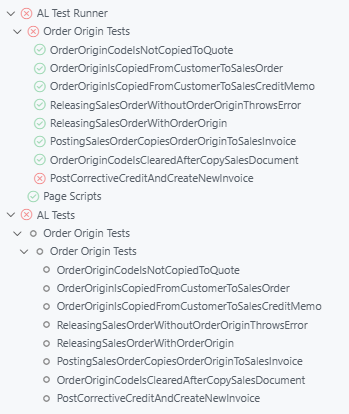
For a while now AL Test Runner has been able to download the code coverage details after running your tests, output a summary of the objects that were hit with some stats and then highlight the lines which were hit in the previous test run or the last time you ran all the tests. More in the docs.

Recently, VS Code has added an API for test extensions to feed data into and some UI to show the coverage. It’s pretty cool.

Test Coverage

The first thing you’ll notice is this “Test Coverage” panel which is displayed after the tests have run. It displays a tree of the ojbects which have been hit by the run and the percentage coverage (in statement coverage terms).

If you click on a file in the tree it will open the file in the editor and you will see lines which were hit highlighted in the gutter.

In fact, these highlights will continue to be shown as you navigate around your source code. I’m leaving the “Code Coverage: Off/Previous/All” item in the status bar as this highlights each whole line and is much easier to see if you want to zoom out and get an impression of coverage of the whole file.

Coverage from Previous Runs

Coverage from previous test runs is stored and can be accessed from the Test Results pane (usually shown at the bottom of the screen). It might be useful to switch between test coverage results for test runs to see how to coverage % has changed over time (with the usual caveat about not using code coverage as a target).

The decorations in the gutter to indicate which lines have been covered in the current file are only shown when the latest test coverage is being displayed. That makes sense because the code coverage detail is all based on line numbers. Once you’ve made some changes to a file those line numbers are obsolete.