Extensible Enums in Dynamics 365 Business Central

Option fields: great for scenarios where you want to provide a fixed, predefined list of values. Only a single value can apply and the user gets a convenient dropdown to select from. Perfect, until you want to extend the list of values.

Enter enums.

Documentation is here: https://docs.microsoft.com/en-us/dynamics365/business-central/dev-itpro/developer/devenv-extensible-enums

The Theory

Enums are object types in their own right, not merely data types you can assign to fields or variables.

Let’s have a quick look at how it works. Who doesn’t love a calculator example?

Define a new enum like this:

enum 50100 Operator
{
  Extensible = true;
  value(0; Addition)
  {
    Caption = 'Addition';
  }
  value(1; Subtraction)
  {
    Caption = 'Subtraction';
  }
}

Notice the Extensible property. You need to explicitly decide that other apps can extend your values, which seems sensible. Use that enum as the data type for a table field or variable as you see fit.

Operator : Enum Operator;

As with options you’ll typically handle enums with a case statement. Also use the same double-colon syntax you use for options.

case Operator of
  Operator::Addition:
    exit(a + b);
  Operator::Subtraction:
    exit(a - b);
  else
    begin
      OnCalculate(a, b, Operator, Result, Handled); //event publisher
      if Handled then
        exit(Result);
    end;
end;

Notice the else in the case block. There isn’t much point making the enum extensible if you don’t have a way to handle the extended values. We’re throwing an event for any Operator values that we don’t recognise. Perhaps we ought to also throw an error if the event is not handled as that would indicate someone has added an enum value without handling the calculation – but you get the idea.

Now another app developer can extend your calculator with some new operators in a dependent app.

enumextension 50100 OperatorExt extends Operator
{
  value(50100; Sin)
  {
    Caption = 'Sin';
  }
  value(50101; Cos)
  {
    Caption = 'Cos';
  }
  value(50102; Tan)
  {
    Caption = 'Tan';
  }
}

The enumextension adds new values to the Operator enum. These values are not handled by the case statement above so the event is called. Subscribe to the OnCalculate event to provide the result and set the Handled flag.

The Practice

Three scenarios spring to mind where extending an enum could be particularly useful.

Adding On-premise Support

As a rule we try to write our extensions so that they can target either Business Central platform (SaaS or on-premise). The target property in app.json is set to “Extension” (or just omitted).

calculator.jpg

Let’s imagine that you want to use the .Net System.Math library to calculate the results of sin, cos and tan. You can’t use .Net in an app with a target of Extension.

What you could do instead is build your base calculator functionality in a SaaS-friendly, target-Extension app and add your .Net functionality in a dependent on-prem, target-Internal app instead.

I know, in the real world there are probably a bajillion free web services that could provide the result or you could use .Net in an Azure Function. Heck, you could even calculate the result manually if you really wanted (but seriously, don’t). Then again, in the real world you’re probably not making a calculator app.

You might want to handle things different if you’re running on-prem or on-SaaS though. For example, you might need to use .Net or interact with local resources like printers or file shares. Those are off-limits to SaaS apps. Rather than making your whole app target-Internal you could have a base app that you extend with your on-prem functionality.

Adding Additional Providers

Another model might be where you need several codeunits to provide some common functionality. Let’s say you have some integration with shipping agents – submitting consignment details, retrieving tracking numbers and label details etc.

You could create an enum with the name of the shipping agents that you integrate with in your app, but make allowance for that enum to be extended by other apps and throw appropriate events for them to handle integration with different agents.

Reusability

Finally, and perhaps most obviously is reusability. How many times have you copied option fields with the same option string and captions from one table to another? For instance, how many different places in standard does a “Document Type” field with an identical set of options occur? (I started to go through but quickly realised it was more than I could be bothered to count).

Instead of doing that you can just define the enum and its values once and reuse it – even if you don’t plan on making it extensible. You know it makes more sense.

Extension Settings in Microsoft Dynamics Business Central

Edit: The following is only relevant for Business Central sandbox environments. External service calls will always be permitted in production tenants.

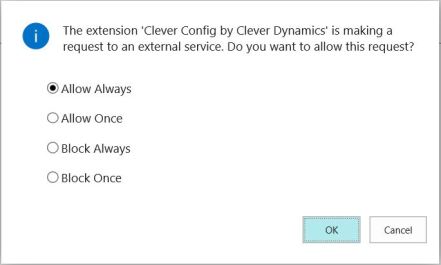
Recent builds of Business Central introduce a check when your app attempts to call an external service through the HttpClient type in AL. The user will see a message like this:

“The extension [extension name] by [publisher nameis making a request to an external service. Do you want to allow this request?”

external service request

This decision is saved into the database and is editable from the Extension Settings page…

extension settings.JPG

…which stores the setting in the NAV App Setting table.

NAV App Setting record.JPG

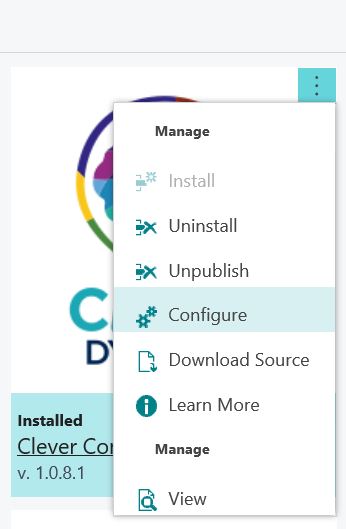
Either search in the menu for Extension Settings or use the AssitEdit button for the extension on the Extension Management page.

extension management config.JPG

The only editable setting on the Extension Settings page at the moment is “Allow HttpClient Requests” but I guess we might see this table being used for more per-app configuration settings in future.

You can delete the record from the Extension Settings page if you like. If you do the user will be prompted to make the decision again the next time the app attempts to call an external service.

For the curious, if you choose to block the request or uncheck the “Allow HttpClient Requests” option on the Extension Settings page the user will see this message:

“The request was blocked by the runtime to prevent accidental use of production services.”

“About This Page” in Dynamics NAV 2018

My original post about adding some “About this Page” functionality to the web client for Dynamics 365 Business Central has received a bit of attention – enough to demonstrate that there is demand for this in the standard product. Hopefully, this is something that Microsoft will address in time.

They certainly won’t address it, however, for Dynamics NAV 2018. You’ve still got the Windows client, so you could just use that but given that I’ve had a request to make my extension 2018-compatible and it’s a fairly simple change, I have.

App file here: James Pearson_About This Page_1.0.4.0 NAV2018

Source here: https://github.com/jimmymcp/BusinessCentral-AboutThisPage/tree/nav2018

Enjoy.

Business Central Tenant Management

One of our apps calls for Business Central to communicate with our external service some key details about the tenant:

  • The Azure tenant id
  • The type of environment (production or sandbox)

but how to get at those details?

Maybe I’m a simpleton and maybe the information is out there somewhere and I just couldn’t find…but I couldn’t.

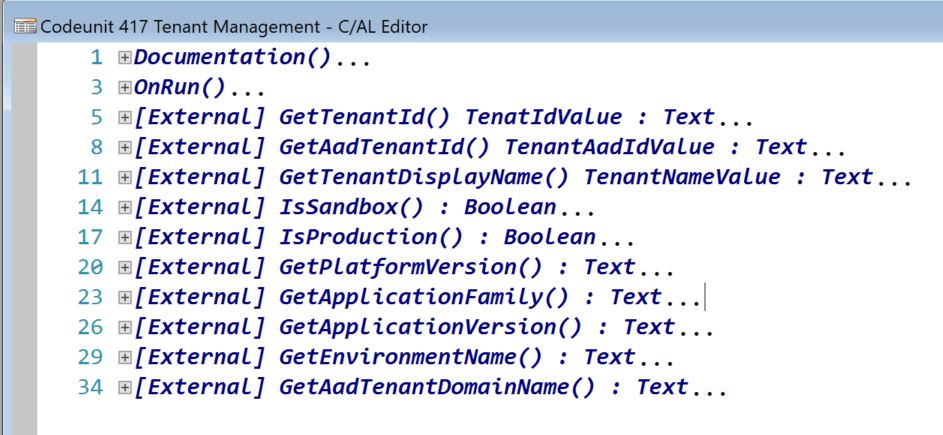
Turns out there is a codeunit (#417) called Tenant Management with a bunch of function to provide just this sort of information.

Tenant Mgt.JPG

Good to know.

PS: in case you’re wondering, GetAadTenantID returns ‘common’ for an on-premise installation.

Business Central Development With CI/CD

If you follow blogs about Dynamics 365 Business Central / NAV development, attended development sessions at Directions or have seen the schedule for NAVTechDays then you may have noticed the terms “CI/CD” or “pipeline” being thrown around.

What do those terms actually refer to? And how does it affect the way we approach development?

Definitions

CI = “continuous integration”
CD = “continuous delivery” (or “continuous deployment”, if you prefer)

These are pretty old development concepts. Check out the Wikipedia entry if you want an overview and some of the history. I would summarise it like this.

Continuous integration: incorporate new development into your main development branch as soon as possible.

Continuous delivery: get that development in front of your end users as quickly as possible.

The concept of a pipeline is having a defined series of steps that new development goes through. Build, test, publish and install into target environment(s) – automated as much as possible

Why?

All this talk of  “as soon as possible” sounds a little reckless. Is this really a good idea?

In a nutshell, we’re trying to minimise the time between identifying some changes that the customer needs (some new feature or bug fix) and those changes actually being deployed onto the customer’s system.

We want to avoid work in progress changes hanging around for ages. You’ve probably experienced the problems that come with that:

  • The work becomes harder to merge back into the master branch as time goes by
  • Future development dependent on these changes is held up or goes ahead with the worry it will clash with work in progress
  • People start to forget, or lose interest, in why the changes were required in the first place making testing and code review harder or less effective
  • The customer loses interest in the development and is less inclined to test or use the new development

How?

Integration

All my experience is with Azure DevOps (what used to be called Visual Studio Team Services and used to be called Team Foundation Server) but other platforms provide similar functionality.

We start by defining small, discrete work items. I don’t have a fixed rule, but if the work can’t be completed in a single sprint (say, 2 weeks) then it’s probably too big and you should split it into smaller chunks.

The developer gets to work and puts their changes in for review. Pushing those changes up to the server triggers the build pipeline. Typically this is a series of tasks performed by a build agent running on a server that you control. Azure DevOps provides several options for agents hosted by Microsoft but for now they don’t provide the option we need to build AL packages.

I won’t go into detail about our build pipeline now but it includes:

  • Creating a Docker container
  • Compiling the AL source with the compiler included in the container
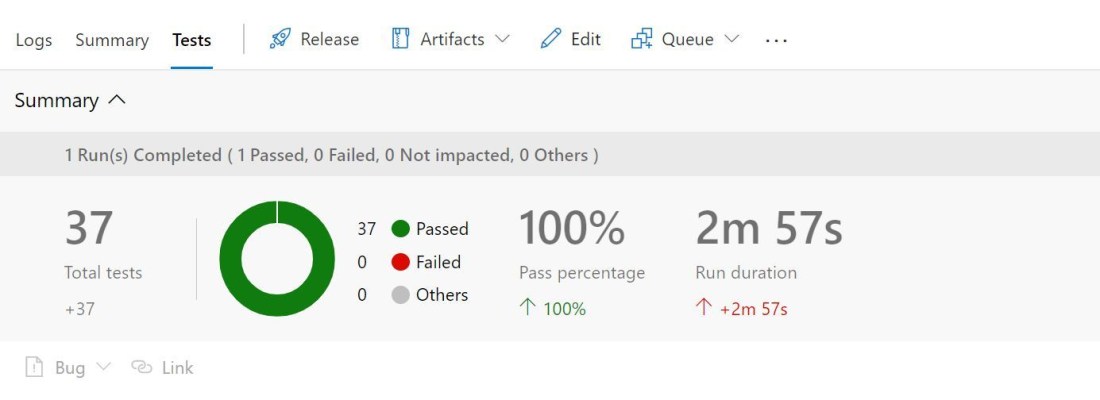
  • Running the automated tests (the developer should have included new tests to cover their changes)
  • Uploading the test results and the .app files (we split the product and its tests into two separate apps) as build artefacts
  • Notifying the developer of the build result

By the time any of the reviewers comes to look at the code review we should already that:

  • All the tests have passed
  • The changes can be merged into the master branch without any conflicts

Nice. We can be much more confident hitting the Approve button knowing it passes the tests and will merge neatly with master. We get the changes incorporated back into the product quickly and have a clean starting point for the next cycle.

Delivery

Delivery is a different story. At the time of writing our release process is to make the new .app package available on SharePoint. We don’t automate that.

With Dynamics NAV / BC on-premise there is scope for automating the publish & install of the new app package into target environments and tenants. That would involve the definition of a release pipeline. An agent on the target environment could collect the app package (or fob, or text file) created by the build pipeline and use PowerShell to import/compile/publish/install into one or more databases.

We don’t attempt this as in many cases we don’t control the environments that our apps are installed into. The servers are not ours to install agent software onto and be responsible for.

This is especially true of Business Central SaaS as we are developing apps for AppSource. No app package* makes it onto the platform until it has passed the AppSource validation process and deployed by Microsoft on their own schedule.

*unless it is developed in the 50,000 – 99,999 object range and uploaded.

Getting Started

I hope that’s whet your appetite to go and investigate some more. Before you do you’ll need to be up and running with source code management and automated tests (perhaps more of that another time).