I’ve written before about using the WebPageViewer control add-in to add a little zest et je ne sais quoi to your BC pages. You can set html content like this or use JavaScript to neatly format JSON like this.
Obviously, you have more control over how your page looks and behaves if you write your own control add-in, but for smaller jobs where you just need a little sprinkling of HTML and (your favourite programming language and mine) JavaScript then the WebPageViewer might be just fine.
Clipboard
This time I wanted to access the clipboard. We’re generating a URL that we want users to be able to send. Sure, you can pop the URL into a message and ask the user to copy it – but what if they don’t select the whole link? It’s just not cool.
“Wouldn’t it be nice if we could show the user a little “Copy” button and write the link straight to the clipboard?” (…is not something that The Beach Boys sang about in the 60s but no doubt would have done if Business Central had been around at the time).
Add the content that you want to copy to some HTML control (I’m using a textarea in this case) and add a button which calls a function onclick to copy the text. For some extra UX goodness I’ve added an eventListener to the click event which changes the button’s value to “Copied” and changes the background colo(u)r to a Business Central teal to match the OK button of the page (the page type is StandardDialog).
local procedure SetContent()
var
    HTML, JS : Text;
begin
    HTML := @'<textarea id="textToCopy" cols="50" rows="5" style="font-family: Segoe UI;">This is some sample text...

...and here is some more
</textarea>
    <input type="button" value="Copy" onclick="copyToClipboard()" id="copyButton" style="vertical-align: top;" />';

    JS := @'document.getElementById("copyButton").addEventListener("click", () => {
    let copyButton = document.getElementById("copyButton");
    copyButton.value = "Copied";
    copyButton.style.backgroundColor = "#007E87";
    copyButton.style.color = "white"
});

function copyToClipboard() {
    let copyText = document.getElementById("textToCopy");
    copyText.select();
    copyText.setSelectionRange(0, 99999); // For mobile devices
    navigator.clipboard.writeText(copyText.value);
}';

    CurrPage.WebPageViewer.SetContent(HTML, JS);
end;
Insecure Origins Treated as Secure
If you are testing this in a web client you access over http e.g. you likely access a local Docker container without SSL then you will find that this doesn’t work. No obvious error, it just fails to write to the clipboard.
Pop open the browser developer tools and you will see this in the console.
That is because by default the clipboard is not available to sites which are served over http. You can override that behaviour per site with a browser flag.
Open up chrome://flags, edge://flags or however you access your preferred Chromium-based browser flags (I haven’t tested in Firefox, Safari or anything non-Chromium) and search for “Insecure origins treated as secure”. Enable that setting and enter the URL that you access the web client at.
It won’t be necessary to do the same when the web client is served over https.
A while ago I posted a series of thoughts about integration between Business Central apps. You can find the original posts here. Those posts are 7 years old, presumably there must be a better way to do it now? It’s time for a fresh look…
Objective
First, let’s clarify what we are trying to achieve here. I’m interested in the ability for one app to call the functionality in another app without a dependency existing between the two.
Stop!
Wait. Why do you want to do that? Are you some sort of maniac? Allow me to explain (and yes, possibly). But first, let me spell the following out very clearly:
⚠️ If you need two apps to work with one another and you can afford to create a dependency between the two then you should do that. Disregard all of the following and define the dependency. Thank you for your attention. Goodbye.
Scenario
This post is concerned with integration between apps which cannot depend upon one another. Usually this is driven by a commercial consideration i.e. the business must be able to sell and use the apps independently of one another. We don’t want to force the customer to purchase both, but if they do have both then they must interact with one another.
Let’s imagine that we have two separte apps, one which is responsible for Web Shop Integration and another which handles Shipping Agent Integration.
We want to keep these apps separate. We don’t want to force the customer to buy both apps if they only use one of them. We will use Shipping Agent Integration with customers who don’t have a web shop and we will also use the Web Shop Integration for customers who don’t ship anything (perhaps they are selling NFTs – in which case shipping agent integration is the least of their worries).
Calculating Shipping from Web Shop Integration
However, if the customer does purchase both apps then they need to be able to work together. Maybe we need to calculate an estimated delivery date and a shipping charge and add that to the order.
How can Web Shop Integration call the functionality in Shipping Agent Integration if it doesn’t depend on it? Web Shop Integration needs to compile, publish and run correctly even if Shipping Agent Integration isn’t installed.
Options
Design Considerations
There are lots of different approaches to solving this problem. It will help evaluating them to have some criteria to judge them against.
Strongly typed – I want a solution that is strongly typed i.e. I want my IDE1 to load the available methods, their signatures and documentation from Shipping Agent Integration. I want to catch development mistakes at compile-time, not run-time
Separation of concerns – I don’t want either app to know anything about how the other works. Shipping Agent Integration should just advertise the available functionality that Web Shop Integration can call. The web shop doesn’t need to know or care how that is implemented
I went through some of these options in the original series of posts, but I will briefly recap them here. After all, someone has to keep creating original content for the LLMs to consume and regurgitate.
Record & field refs
Strongly typed: ❌, Separation of Concerns: ❌
Your first thought when needing to integrate may be to just crack open a record ref and read/write the data that you need. You can first check whether the target table or field actually exists so that Web Shop Integration continues to work when Shipping Agent Integration is not present.
Trouble is, you’ll need to open the reference by a hardcoded id or name. You’ll get no compile error if you get it wrong. If the table structure changes in Shipping Agent Integration for any reason then you will also need to make a change in Web Shop Integration – but you won’t get any warning or compilation error to remind you.
Shared data layer
Strongly typed: ✅, Separation of Concerns: ❌
If your apps are of a certain vintage2 you may have created a shared data layer which both apps depend on. In which case, you don’t need record refs, you can just read/write directly from/to the tables that you are interested in. Shipping Agent Integration can modify the tables which are defined in the data layer with additional validation and trigger code.
Same problem as before though, with this solution Web Shop Integration needs to know too much about how Shipping Agent Integration stores its data. If the data model changes then both apps need to be modified to match.
Microservices
Strongly typed: ❌, Separation of Concerns: ✅
Or maybe a microservices-like solution is the way to go? Have the apps send messages to one another. Of course, in this context we’re talking about HTTP calls between the microservices. You could do that I suppose – Shipping Agent Integration could define an API which Web Shop Integration calls over HTTP. Then again that would be insane. Think about the performance hit and having to handle the authentication.
But, maybe we could implement something similar but kept internal to BC? “Post” messages to the Shipping Agent Integration app with Codeunit.Run(<record which holds the message>)? Implement some sort of message queue in a shared dependency?
All possible, but not strongly typed. How does someone developing Web Shop Integration know what functionality is available in Shipping Agent Integration? I’d guess you’d need to hardcode the expected structure of the messages (presumably in JSON)?
Not such a problem in JavaScript / PowerShell / a language which serializes/deserializes between text and objects. That’s not really a thing in AL though.
Event in shared dependency
Strongly typed: ✅, Separation of Concerns: ✅
We could have an event in a shared dependency. Let’s say that we add a new app, Integration Layer, which both Web Shop Integation and Shipping Agent Integration depend on.
We define an event somewhere in that app with the signature that we need. Pass all the context that Shipping Agent Integration needs and get the result back via parameters passed by reference.
procedure OnCalculateShippingCharge(var SalesHeader; var TempSalesLine; var ShippingCharge: Decimal; var Handled: Boolean)
This has the benefit of being strongly typed – someone developing Web Shop Integration knows what they need to pass to the event but doesn’t need to know about how it is implemented.
So far, so good. It still isn’t the most elegant solution though – raising an event and hoping that someone subscribes to it isn’t quite the same as calling the functionality in Shipping Agent Integration.
Come to think of it, was it even Shipping Agent Integration which subscribed to it? Did several apps subscribe? A handled flag only tells you that 1 or more subscribers picked it up (assuming that they set handled to true, although there is nothing to guarantee that they did).
Bridge App
Strongly typed: ✅, Separation of Concerns: ✅
Rather than a shared dependency, you could have a shared dependent app.
You could define events in Web Shop Integration which the Bridge App subscribes to, calls the relevant functionality in Shipping Agent Integration and passes the results back to Web Shop Integration.
This is fine, and might be the best solution if you don’t control one of the apps e.g. you need an app installed from AppSource to integration with one of your own.
The downside is that there is nothing to guarantee that if both Web Shop Integration and Shipping Agent Integration are installed that the Bridge App is also installed. The Web Shop will work fine, but the functionality in Shipping Agent Integration won’t get called.
Presumably you only intend for the Bridge App to subscribe to these new events in Web Shop Integration, but you can’t stop anyone else subscribing to them. Well, you could by making them InternalEvent and then setting internalsVisibleTo in Web Shop Integration, but that just swaps in a new set of problems. If you have functionality in Web Shop Integration which is genuinely internal (i.e. the Bridge App should not have access to it) you’ve got no way of giving access to the events but not the other internals.
Finally, you are likely only joining two specific apps together in this way. If you have several apps which need to work together in the presence or absence of several other apps you could quickly end up with more Bridge Apps than you want to manage.
Interface in shared dependency
Strongly typed: ✅, Separation of Concerns: ✅
This will be the subject of a follow up post, but will involve defining an interface for Shipping Agent Integration in a shared integration layer and then having Web Shop Integration call its implementation directly, without needing to throw an event.
Each app remains responsible for its own data and functionality and we can have a mechanism for Web Shop Integration to call the Shipping Agent Integration functionality directly without reflection or events. Cake ✅, Eat it ✅
To be continued…
Notes
a few months ago I would have written “VS Code” a second thought, but I suppose you might be using Cursor or any other mad AI-powered editor by the time you read this
the few versions where Microsoft advertised the performance impact of having many table extensions to the same tables and tried to convince us that it was our problem to solve 😅
I don’t know if anyone needs this. I’m not sure if even I need this yet, but I am starting to find it useful. We use test plans in Azure DevOps to record the steps and results of manual testing.
I figured that if I’m writing decent comments in my automated (integration*) tests then I should be able to just copy them to the test plan in DevOps, or at least use them as the basis.
Find your test (or test codeunit) in the testing tree, right click and export to CSV. That reads your //[GIVEN], //[WHEN] and //[THEN] lines and drops them into the right format to import into DevOps.
*yes, I know, the terminology is off, don’t fight me. By “integration” tests I mean scenarios that resemble what the user is doing in the client**, as opposed to calling codeunits, table methods or field validations directly.
**although, without using TestPages. I’m not really trying to simulate user behaviour in the client, I’m trying to recreate the scenario – but these are automated tests and they should still run fast. Use the actual client and your actual eyes to test the client***.
***and maybe page scripts****
****which also now show up in your test tree when you save the yml export into your workspace.
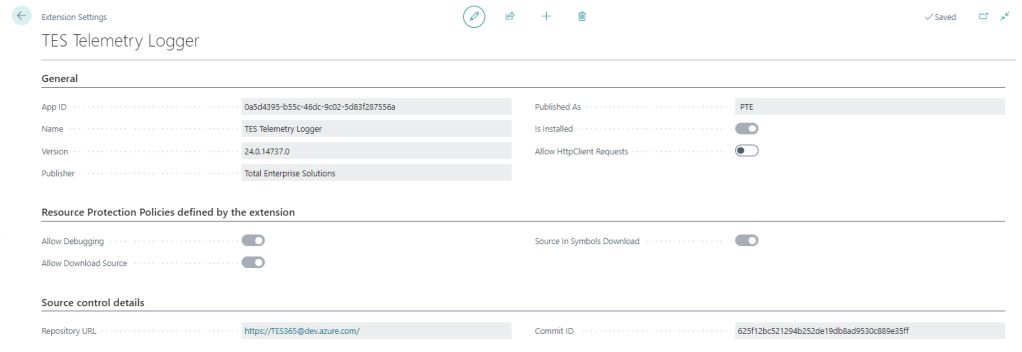
For a long time the only thing additional data you could see on the Extension Settings page was whether to allow Http calls from this extension (the Allow HttpClient Requests checkbox). This page has got some love in BC25.
That setting is still the only thing that you can control, but now you can also see:
Resource Protection Policies
Corresponding to resource exposure policies in app.json (maybe “exposure” sounded a little risqué for the user interface). This indicates whether you can debug, download the source code and whether the source is included when you download the symbols.
That might be useful to know before you create a project to download the symbols and attempt to debug something.
Interestingly, extensions which don’t expose their source code get the red No of shame in the Extension Management list.
Source Control Details
Includes the URL of the repository and the commit hash that the extension was created from. That’s cool – you can link straight from the Extension Settings page to the repo in DevOps / GitHub / wherever your source is. That’s a nice feature either for your own extensions or open source extensions that you are using.
It may be that each time you build an app that you already give it an unambiguous, unique version number (we include the DevOps unique build id in the extension version) but the commit hash is nice to see as well.
How Does it Know?
Where does that information come from? It is included in the NaxManifest file, extract the .app file with 7-Zip and take a look.
When the app is compiled by alc.exe there are additional switches to set this information. These are some of the switches that you can set when compiling the app.
These switches are not set when you compile the app in VS Code (crack the app file open with 7-Zip and check), but you can set them during the compilation step of your build. If you are using DevOps pipelines you can make use of these built-in variables Build.SourceVersion and Build.Repository.Uri to get the correct values.
That’s if you roll your own build pipelines. If you use some other tooling (AL-Go for GitHub, ALOps etc.) then the compilation step will be in their code. They may have already implemented this, I don’t know.
Side note: Microsoft want to push us to use 3rd party tooling rather than making our own (e.g. I watched this podcast with Freddy the other day) but personally I still see enough value in having control over the whole DevOps process to justify the small amount of time I spend maintaining and improving it. I’m open to changing that stance one day, but not today.
Recently I got stung by this. As a rule we keep the application version in app.json low (maybe one or two versions behind the latest) so that it can be installed into older versions of Business Central. Of course this is a balance – we don’t want to have to support lots of prior versions and old functionality which is becoming obsolete (like the Invoice Posting Buffer redesign, or the new pricing experience which has been available but not enabled by default for years). Having to support multiple Business Central features which may or may not be enabled is not fun.
On the other hand, Microsoft are considering increasing the length of the upgrade window so it is more likely that we are going to want to install the latest versions of our apps into customers who are not on the latest version of Business Central.
Runtime Versions
But that wasn’t really the point of the post. The point is, there are effectively two properties in app.json which define the minimum version of Business Central required by your app.
application: the obvious one. We mostly have this set a major prior to the latest release unless there are specific reasons to require the latest
runtime: the version of the AL runtime that you are using in the app. When new features are added to the AL language (like ternary operators – who knew a question mark could provoke such passionate arguments?), as, is, and this keywords, or multiple extensions of the same object in the same project
I didn’t want to get caught out by this again so I added a step into our pipeline to catch it. The rule I’ve gone with is, the application version must be at least 11 major version numbers higher than the runtime version. If it isn’t then fail the build. In that case we should either make a conscious decision to raise the application version or else find a way to write the code that doesn’t require raising the runtime version. Either way, we should make a decision, not sleep walk into raising our required application version.
Why 11? This is because runtime 1.0 was released with Business Central 12.0. Each subsequent major release of Business Central has come with a new major release of the runtime (with a handful of runtime releases with minor BC releases thrown in for good measure).
The step is pretty simple ($appJsonPath is a variable which has been set earlier in the pipeline).
steps:
  - pwsh: |
      $appJson = Get-Content $(appJsonPath) -Raw | ConvertFrom-Json
      $runtimeVersion = [Version]::Parse($appJson.runtime)
      $applicationVersion = [Version]::Parse($appJson.application)

      if ($applicationVersion -lt [version]::new($runtimeVersion.Major + 11, $runtimeVersion.Minor)) {
        Write-Host -ForegroundColor Red "##vso[task.logissue type=error;]Runtime version ($runtimeVersion) is not compatible with application version ($applicationVersion)."
        throw "Runtime version ($runtimeVersion) is not compatible with application version ($applicationVersion)."
      }
    displayName: Test runtime version





 James Pearson