Extension Settings in Microsoft Dynamics Business Central

Edit: The following is only relevant for Business Central sandbox environments. External service calls will always be permitted in production tenants.

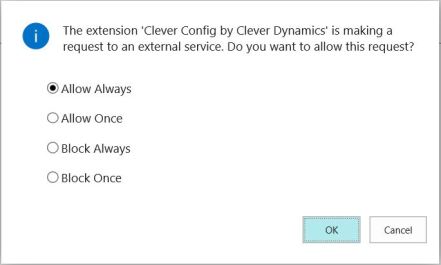
Recent builds of Business Central introduce a check when your app attempts to call an external service through the HttpClient type in AL. The user will see a message like this:

“The extension [extension name] by [publisher nameis making a request to an external service. Do you want to allow this request?”

external service request

This decision is saved into the database and is editable from the Extension Settings page…

extension settings.JPG

…which stores the setting in the NAV App Setting table.

NAV App Setting record.JPG

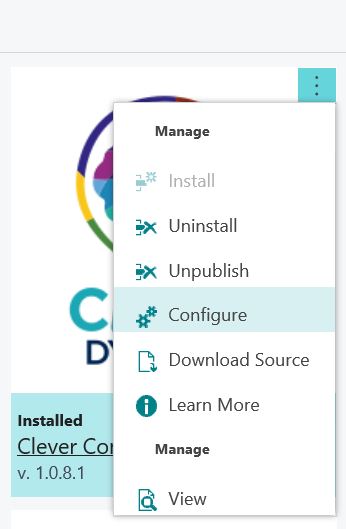
Either search in the menu for Extension Settings or use the AssitEdit button for the extension on the Extension Management page.

extension management config.JPG

The only editable setting on the Extension Settings page at the moment is “Allow HttpClient Requests” but I guess we might see this table being used for more per-app configuration settings in future.

You can delete the record from the Extension Settings page if you like. If you do the user will be prompted to make the decision again the next time the app attempts to call an external service.

For the curious, if you choose to block the request or uncheck the “Allow HttpClient Requests” option on the Extension Settings page the user will see this message:

“The request was blocked by the runtime to prevent accidental use of production services.”

“About This Page” in Dynamics NAV 2018

My original post about adding some “About this Page” functionality to the web client for Dynamics 365 Business Central has received a bit of attention – enough to demonstrate that there is demand for this in the standard product. Hopefully, this is something that Microsoft will address in time.

They certainly won’t address it, however, for Dynamics NAV 2018. You’ve still got the Windows client, so you could just use that but given that I’ve had a request to make my extension 2018-compatible and it’s a fairly simple change, I have.

App file here: James Pearson_About This Page_1.0.4.0 NAV2018

Source here: https://github.com/jimmymcp/BusinessCentral-AboutThisPage/tree/nav2018

Enjoy.

Business Central Tenant Management

One of our apps calls for Business Central to communicate with our external service some key details about the tenant:

  • The Azure tenant id
  • The type of environment (production or sandbox)

but how to get at those details?

Maybe I’m a simpleton and maybe the information is out there somewhere and I just couldn’t find…but I couldn’t.

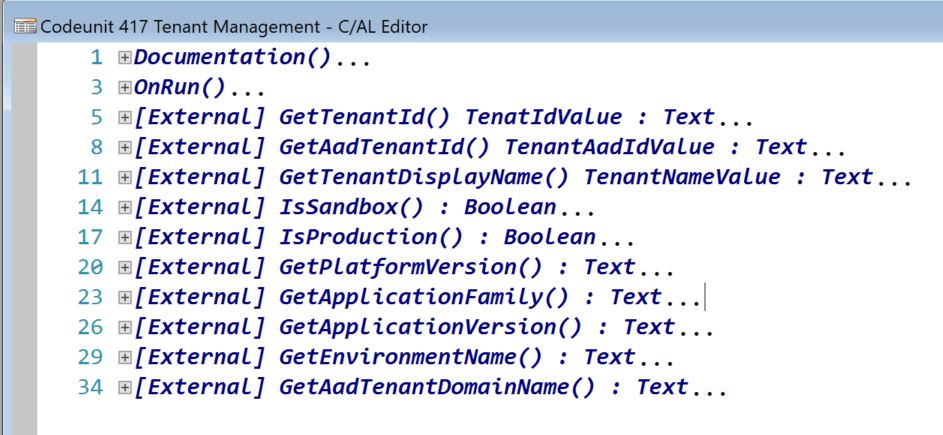
Turns out there is a codeunit (#417) called Tenant Management with a bunch of function to provide just this sort of information.

Tenant Mgt.JPG

Good to know.

PS: in case you’re wondering, GetAadTenantID returns ‘common’ for an on-premise installation.

“About This Page” in Dynamics 365 Business Central

We’re entering a brave new world of web-client-only experience with Dynamics 365 Business Central. That is simultaneously great news and presents a challenge for those who know and love the Windows client.

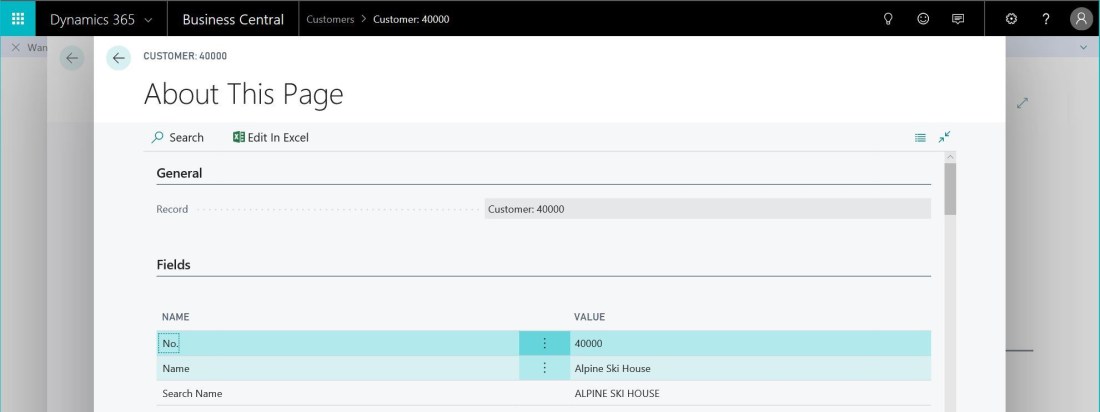
It doesn’t take long for most consultants to realise that they can’t view the “About this Page” (Ctrl+Alt+F1) page in the web client – and to get upset about that. In my experience it was used a lot to read values of fields in the current record that aren’t visible on the page.

Hopefully this is something that Microsoft will address in a future version of the client, but in the meantime I’ve created an extension that provides some of the functionality.

You can download the extension here: James Pearson_About This Page_1.0.4.0

Disclaimer: obviously, if you choose to publish and use this extension in your tenant you do so at your own risk. I don’t take responsibility for any problems you run into.

  1. Extract zip
  2. Use the Upload Extension command on the Extension Management page to publish and install the .app file from #1 into the tenant
  3. Wait for the publish to finish (see the Deployment Status page for more info)
  4. Navigate to a page you’re interested in
  5. Search for (bulb icon in the top right corner, Alt+Q) “About This Page”
  6. Enjoy

This is an initial version and various improvements could be made, if Microsoft don’t give us a better solution first. You can find the code and contribute here: https://github.com/jimmymcp/BusinessCentral-AboutThisPage

Update: v1.0.4

The “About This Page” page now includes the source table and page details. I’ve also renumbered the objects into a different range as 80,000 – 99,999 is going to be reserved for extension objects.


Code review: great, but not just for that reason

It’s easy to imagine that code review is just about monitoring the quality of the code. Squashing bugs, checking best practices have been followed, sniffing out code smells etc.

It is good for that. Having someone other than the original author cast an eye over the development is useful – it’s very difficult to objectively check code that you have written and think already works (after all, you wouldn’t request a review if you didn’t think it worked).

But, it’s hard to get excited about code review if everyone on the team thinks finding problems is the sole focus. Who is going to cheerfully submit their work for their colleagues to tell them what mistakes they’ve made? Who wants to hand in their homework for collective marking?

Make it clear that the review process is not about criticising individual’s work. Instead, set the right tone and code review stops feeling like an imposition and obstacle to work but an essential part of your development cycle.

1. Ownership

This is probably the biggest benefit – and it doesn’t even directly relate to the code.

The code doesn’t belong to any one developer. If a developer wants to only work on their own code and have no one else work on their code they probably shouldn’t be part of a dev team and definitely shouldn’t ask anyone to review it. That attitude will torpedo to process before it has even left port.

Code review helps involve other devs in the work. This code belongs to the team and we are collectively responsible for its quality. Any of us might need to maintain it or add features in the future.

We’re not critiquing the one developer’s skills, we’re improving the quality of our code.

2. Mentoring

Asking a junior to get involved in code review is a great way to teach them. Not only you get them involved with the work of the team (see #1) but you give them the requirements and the code changes that were made to meet those requirements, on a real project with code that will go into production.

3. Learning

I used to spend the majority of my time developing. Now I spend the majority of my time planning, testing and reviewing development. With so many different technologies to work with and the rate of change how can you hope to keep up unless you are working with it yourself?

Code review is a big help. I’ve learned a lot about standard functionality (NAV and .Net) and seen problems solved in a way I wouldn’t have thought of – a better way.

4. Taking Pride

The simple fact of knowing that someone else is going to take a look at your work makes you take more pride it it. You’ll far less likely to implement some half-baked, hard-coded solution if you know that your colleagues are going to ask you why this code cuts so many corners.

5. Slow Down

An objection levelled against code review is that it slows work down. You need your work to be reviewed before you merge it into live. Your colleagues need to find time to do the review. We’re already busy, we don’t have time for this.

Code review does slow you down – in a good way. Ever been on site or support and made a knee-jerk code change to fix a problem? Ever had that change come back to bite you? And could you have foreseen the problem given more time to think about the consequences of the change?

I answered yes, yes and yes.

Of course some work is urgent. Of course you have the odd bug that must be fixed as soon as possible but do yourself a favour and take the time to think through the code properly before slapping it into live.

Conclusion

Adding a review stage into the development cycle is the single change with the biggest impact on code quality that we’ve made. I can’t imagine how we’d work without it now.

I’ve deliberately kept this post system-agnostic. I think the benefits apply regardless of the system you use to implement code review. In a future post I’ll write about our experiences with code reviews in TFVC and why we migrated to pull requests in Git.