Using Azure DevOps Wiki as a WYSIWYG Editor for Your Static Site

Intro

We’ve got a static HTML site that we host our product documentation on. Our is hosted in Azure Static Web Apps but GitHub pages is a popular option as well (I use it for my AL Test Runner docs). If you’ve got product docs I guess you are hosting them on a static site as well.

We use docfx to generate the site content. I’m not going to post about setting up docfx, building with a pipeline and publishing to Azure or GitHub – there are plenty of details online about that kind of thing already e.g.

This post is about how to maintain the content of the site.

Requirements

Here’s the thing:

  • I need the content to be stored in a Git repo so that I can trigger a pipeline to build and publish the site, but
  • Consultants who are going to be writing some of the content don’t want to have to care about Git – branches, staging, committing, pushing, pulling – they don’t want to learn any of that
  • The docs are written in Markdown – which it is mostly straightforward, but it isn’t always user friendly – especially the syntax to adding ![](media) and ![links](https…)

Options

OptionProsCons
Writage – add-on for Microsoft WordConsultants can write the docs with familiar tools and use the add-on to save the document to .md files & linked mediaThe resulting markdown doesn’t always look the way that it looked in Word. Some of the formatting might be stripped out.

You still need to find a way to stage, commit and push the changes to the Git repo as a separate step.
Visual Studio Code (+ markdown extensions)Can easily write the markdown and see a preview of the output side-by-side.

Extensions can make it easier to add links between pages, link to media etc.

Built in Git support.
You can make it as easy as possible, but in the end VS Code is still a developer’s tool.

This doesn’t give a WYSIWYG experience and the consultants do need to understand at least a little about Git.

…and that is the compromise. Do you have some WYSIWYG designer (Word or something else) that can generate the markdown but then worry about Git? Or do you use something with built-in Git support but is less consultant friendly?

Azure DevOps Wiki

Enter Azure DevOps wikis. They have a WYSIWYG designer with a formatting toolbar to generate the correct markdown and they are a Git repo in the background (cake and eat it 🍰👀).

The formatting toolbar helps you out with formatting, headings, links and so on. You can easily add images and gifs by just copying and pasting into the editor. The image is uploaded DevOps and the markdown syntax inserted automatically.

It also has support for Mermaid diagrams. You need to load the diagram each time you make a change unfortunately, which is a little annoying, but otherwise cool. Just make sure that your static site generator and theme also supports Mermaid (we are using the modern template in docfx).

Pages can be reordered by dragging and dropping them in the navigation. You can also add sub-pages, drag and drop pages to make them sub-pages of other pages.

Sometimes this is a little clunky, but is generally pretty easy to work with.

What you don’t see is that this is updating a .order file which determines the page order to display the pages at the same level in. In this case I will have a .order file for the top-level items and another for the pages under “Product Setup”. We can use that .order file later on to build the navigation for the static site.

Crucially, every time you save or reorder a page, a commit is made to the underlying repository which means you can trigger a pipeline to build and deploy your site automatically. (You could work in separate branches, deploy different branches to different environments, enforce pull requests etc. but I’m not bothering with any of that – part of the goal here is to hide the niceties of Git from the consultants).

Build Pipeline

I won’t walk through all the details of our setup, but now that we have updated markdown content in a new commit we can trigger our build and deploy pipeline (a multi-stage pipeline in Azure DevOps).

Some tips from my experiences:

Building the Table of Contents (toc.yml)

Docfx uses yml to define the navigation that you want the website users to see. Something like this.

items:
  - name: Home
    href: Home.md
  - name: Introduction
    href: Intro.md
  - name: Setup
    items:
    - name: Setup Subpage 1
      href: Setup/Subpage 1.md
    - name: Setup Subpage 2
      href: Setup/Subpage 2.md

The wiki repo will have a file structure like this:

C:.
│   .order
│   Home.md
│   Intro.md
│
└───Setup
        .order
        Subpage1.md
        Subpage2.md

so we can work recursively through the folders in the repo, reading the contents of the .order file as we go and converting them to the required format for toc.yml

The .order is simply a plain text file with the names of the pages at that level of the folder structure in their display order.

Home
Intro

Then build the site e.g. docfx build ... and publish to your hosting service of choice.

Batch Commits

Editing the wiki can create a lot of commits. Everytime you save or reorder a page. You probably don’t want to trigger a build for every commit. You can use batch in your pipeline. If a build is already running DevOps will not queue another until it has finished. It will then queue a build for the latest commit and skip all the commits in between.

trigger:
  batch: true

Mermaid Syntax

Azure DevOps uses colons for a Mermaid diagram

::: mermaid
...
:::

but docfx needs them as backticks, so I have a task in the pipeline which just does a find replace

```mermaid
...
```

Tip – Access the Clipboard with Business Central

Intro

I’ve written before about using the WebPageViewer control add-in to add a little zest et je ne sais quoi to your BC pages. You can set html content like this or use JavaScript to neatly format JSON like this.

Obviously, you have more control over how your page looks and behaves if you write your own control add-in, but for smaller jobs where you just need a little sprinkling of HTML and (your favourite programming language and mine) JavaScript then the WebPageViewer might be just fine.

Clipboard

This time I wanted to access the clipboard. We’re generating a URL that we want users to be able to send. Sure, you can pop the URL into a message and ask the user to copy it – but what if they don’t select the whole link? It’s just not cool.

“Wouldn’t it be nice if we could show the user a little “Copy” button and write the link straight to the clipboard?” (…is not something that The Beach Boys sang about in the 60s but no doubt would have done if Business Central had been around at the time).

Add the content that you want to copy to some HTML control (I’m using a textarea in this case) and add a button which calls a function onclick to copy the text. For some extra UX goodness I’ve added an eventListener to the click event which changes the button’s value to “Copied” and changes the background colo(u)r to a Business Central teal to match the OK button of the page (the page type is StandardDialog).

The interesting bit of the code looks like this (also on GitHub here: https://github.com/jimmymcp/bc-clipboard):

local procedure SetContent()
var
    HTML, JS : Text;
begin
    HTML := @'<textarea id="textToCopy" cols="50" rows="5" style="font-family: Segoe UI;">This is some sample text...

...and here is some more
</textarea>
    <input type="button" value="Copy" onclick="copyToClipboard()" id="copyButton" style="vertical-align: top;" />';

    JS := @'document.getElementById("copyButton").addEventListener("click", () => {
    let copyButton = document.getElementById("copyButton");
    copyButton.value = "Copied";
    copyButton.style.backgroundColor = "#007E87";
    copyButton.style.color = "white"
});

function copyToClipboard() {
    let copyText = document.getElementById("textToCopy");
    copyText.select();
    copyText.setSelectionRange(0, 99999); // For mobile devices
    navigator.clipboard.writeText(copyText.value);
}';

    CurrPage.WebPageViewer.SetContent(HTML, JS);
end;

Insecure Origins Treated as Secure

If you are testing this in a web client you access over http e.g. you likely access a local Docker container without SSL then you will find that this doesn’t work. No obvious error, it just fails to write to the clipboard.

Pop open the browser developer tools and you will see this in the console.

That is because by default the clipboard is not available to sites which are served over http. You can override that behaviour per site with a browser flag.

Open up chrome://flags, edge://flags or however you access your preferred Chromium-based browser flags (I haven’t tested in Firefox, Safari or anything non-Chromium) and search for “Insecure origins treated as secure”. Enable that setting and enter the URL that you access the web client at.

It won’t be necessary to do the same when the web client is served over https.

Tip: Out-ExcelClipboard in PowerShell

From time to time I want to get some result from a PowerShell command into Excel. Unless I’m missing something, there isn’t a great option to do this in standard PowerShell.

I know that you can use Export-Csv or Export-Clixml and then open the file in Excel. I know you can use Out-GridView and then copy and paste from there into Excel (albeit without the column headings). You can also use .Net types but I just want to pipe my result to a function and then paste into Excel. I want <some output of previous functions> | Out-ToExcel

function Out-ExcelClipboard {
    param(
        [Parameter(ValueFromPipelineByPropertyName, ValueFromPipeline)]
        $InputObject
    )
    begin {
        $Objects = @()
    }
    process {
        $Objects += $InputObject
    }
    end {
        $Objects | ConvertTo-Csv -Delimiter "`t" -NoTypeInformation | Set-Clipboard
    }
}

Export-ModuleMember -Function Out-ExcelClipboard

I’ve added this function to my module which I load by default in my PowerShell profile. This took more code than I was expecting. For the curious, ValueFromPipeline tells PowerShell to bind the output from the pipeline to this parameter. It then calls the process block for each value in the pipeline.

You can add begin and end blocks to do extra stuff before and after all the values have been processed. In my case, stuff them all into a new collection, convert to tab-delimited text without including any type information and then pass that value to the clipboard. Lovely.

Tip: Share a Git Hooks Directory Across Your Repositories

TL;DR

git config --global core.hookspath '<path to hooks directory>'

Sharing Hooks Across Repos

I posted before about using a pre-commit hook to check that I’m not committing anything that I really shouldn’t be (anything I’ve tagged with //DONOTCOMMIT).

Hooks are specified in the .git/hooks directory. That’s great, a git repository is completely contained within its parent folder, you can copy it somewhere else and all of the code, history and config come with it.

It’s not so convenient if you want to create some hooks that apply across multiple repositories though. You can just copy your hook files between all of your repos, or it turns out that there is a smarter way. Git config has a core.hookspath key. You can create a folder somewhere with the hooks that you want to apply to all repos and set this key.

Use git config --global to set the value of a key in the global config file and git config --global --list to list the config keys and their current values.

git config --global core.hookspath '<path to hooks directory>'

Tip: Editing RapidStart Configuration Package Files

TL;DR

  1. Extract the package with 7-Zip
  2. Open the extracted file in a VS Code / Notepad++ / text-editor-of-choice
  3. Edit the xml as required
  4. Use 7-Zip to compress in gzip format

Editing Config Packages

Sometimes you might want to edit a config package file without having to import and export a modified copy from BC. In my case I wanted to remove the Social Listening Setup table from the package. Microsoft have made this table obsolete and BC throws an error if I try to import the package with this table present. (Probably not a bad idea – stopping listening to socials).

Fortunately, a rapidstart file is just a compressed xml file. Extract the rapidstart file with 7-Zip and then open the extracted file in a text editor. The format of the file is pretty straight forward. Each table is represented with an XYZList node where XYZ is the name of the table which the table-level settings followed by one or more XYZ nodes with the data.

Here are two records for the Payment Terms table.

<PaymentTermsList>
  <TableID>3</TableID>
  <PageID>4</PageID>
  <SkipTableTriggers>1</SkipTableTriggers>
  <PaymentTerms>
    <Code PrimaryKey="1" ProcessingOrder="1">10 DAYS</Code>
    <DueDateCalculation ProcessingOrder="2">&lt;10D&gt;</DueDateCalculation>
    <DiscountDateCalculation ProcessingOrder="3">
    </DiscountDateCalculation>
    <Discount ProcessingOrder="4">0</Discount>
    <Description ProcessingOrder="5">Net 10 days</Description>
    <CalcPmtDisconCrMemos ProcessingOrder="6">0</CalcPmtDisconCrMemos>
    <LastModifiedDateTime ProcessingOrder="7">
    </LastModifiedDateTime>
    <Id ProcessingOrder="8">{6BD87497-B233-EB11-8E89-E8FD151D8C93}</Id>
  </PaymentTerms>
  <PaymentTerms>
    <Code>14 DAYS</Code>
    <DueDateCalculation>&lt;14D&gt;</DueDateCalculation>
    <DiscountDateCalculation>
    </DiscountDateCalculation>
    <Discount>0</Discount>
    <Description>Net 14 days</Description>
    <CalcPmtDisconCrMemos>0</CalcPmtDisconCrMemos>
    <LastModifiedDateTime>
    </LastModifiedDateTime>
    <Id>{6DD87497-B233-EB11-8E89-E8FD151D8C93}</Id>
  </PaymentTerms>
</PaymentTermsList>

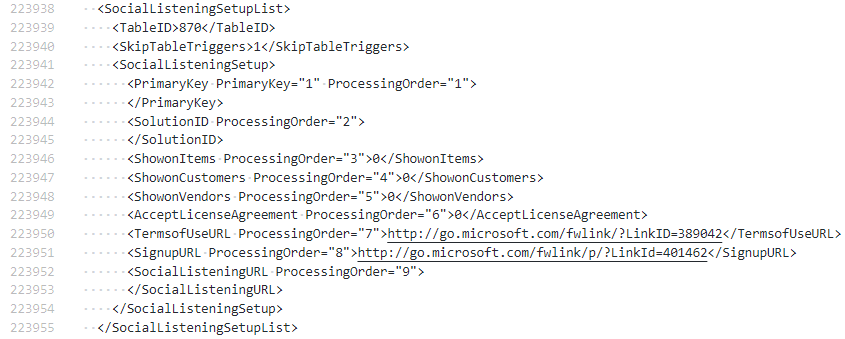
All I need to do is find the offending Social Listening Setup node in my file and remove it. Here it is:

SocialListeningSetupList node

Once you are finished editing you can use 7-Zip to compress the file again with the gzip method and import.

Add to Archive with 7-Zip