Lately I’ve been working more with telemetry, Application Insights, the excellent Power BI report and samples from Microsoft and writing a little KQL. Back in the days when you actually knew where your SQL server was I used to write a lot of ad-hoc SQL for analysis or troubleshooting so getting into KQL has been nice.
KQL sort of looks like SQL…but with the SELECTand FROMclauses switched round…and use projectinstead of SELECT…and use join kind=leftouter instead of LEFT JOIN…and DON’T WRITE EVERYTHING IN CAPS.
At least WHERE is still the same (but stop shouting and use whereinstead of WHERE).
If you want to get into writing your own KQL I’d recommend Kusto Explorer and this post got me started with creating the connection to Application Insights.
Variables
Like with SQL you can create your own variables for use later in your script. So you probably use SET or DECLAREthen? No, use letlike in JavaScript.
let tenantId = "c042cd54-77a9-4b96-aa0b-fc43bd0161c7";
Then use that variable in your script.
let tenantId = "c042cd54-77a9-4b96-aa0b-fc43bd0161c7";
traces |
    where customDimensions.tenantId == tenantId
Notice:
the semicolon between the statements, as in JavaScript (or not…digression)
no blank line between the statements, otherwise they are interpreted as separate scripts and your where line will break
the double equals – remember, like JavaScript, not T-SQL
the table (traces) is piped to the where, like a scripting language
Dynamic Data Type
KQL supports a bunch of data types with built-in functions to manipulate them and convert between them but it also has a dynamic data type which is a generic container to hold any of the other types – like a variant in AL.
I’ve found this useful for creating a dictionary of values that I want to lookup later in the script. I’ve been querying the signals for scheduled tasks and job queue entries. These signals include the object ids that were executed, but not their names.
We can use the dynamic function to create a dynamic value and parse some JSON to create a dictionary of object id and object name. Later in the script we can retrieve the object name with square brackets.
You can name the column in the projected output with columnName =
Use tostring() to cast the dynamic value in customDimensions to a string
DataTable
Creating a dictionary was enough for me because I’m mostly dealing with codeunits and I don’t care if there are pages or tables with the same id. If you do care then you could create a table instead with the datatable operator. Like this:
let objectNames = datatable(objectType: string, objectId: int, objectName: string)[
    "Table", 18, "Customer",
    "Codeunit", 80, "Sales-Post"
];
objectNames
| where objectType == "Table" and objectId == 18
| project objectName
Sometimes it would be useful to know how your code has been reached. For example, how and why is this sales line being inserted, or this sales order released? You might want to react differently in your code depending on the situation.
In my case I wanted to know if my code has been reached because a configuration package is currently being applied. In the end we decided this wasn’t needed in the product but I thought it was interesting enough to share anyway.
It might be enough just to know which field the user was validating when your code was reached, in which case you can just check CurrFieldNo.
Consider how you are going to write tests for this though. I try to avoid using TestPage variables in tests so you need some other way to simulate the user validating the field on the page. It isn’t big or clever but you can have a method to set CurrFieldNo.
internal procedure SetCurrFieldNo(FieldNo: Integer)
begin
    CurrFieldNo := FieldNo;
end;

----

[Test]
procedure TestingSomethingOrOther()
var
    SalesLine: Record "Sales Line";
begin
    ...
    SalesLine.SetCurrFieldNo(SalesLine.FieldNo("No."));
    SalesLine.Validate("No.", Item."No.");
    ...
end;
RunTrigger
If you extend table triggers with table extensions they will only be called with Insert/Modify/Delete(true);
If you subscribe to the OnBefore/OnAfter Insert/Modify/Delete events in a codeunit then pay attention to the RunTrigger parameter.
Don’t forget to also pay attention to whether the record is temporary with Rec.IsTemporary(); You probably want your code to behave differently depending on whether the record is temporary or not.
Alternate Code Paths or Events
Sometimes the base app (or other app that you are extending) might have anticipated that you need to be able to distinguish between certain scenarios.
For example, Release Sales Document might be called by a user clicking on the Release action on the Sales Order page or it might be called deep in the warehouse posting routine. Those are very different contexts and you might need to react differently depending on which it is.
In this case, Release Sales Document has the concept of a “manual” release for when it has been invoked by the user. There are separate events you can subscribe to depending on if you only want to react to a manual release or all releases.
I’m not keen on this design in the base app – but that ship has long since sailed, carrying approvals and pre-payments with it.
Investigate the Callstack
We could capture the current callstack, see where we’ve come from and choose how to react.
You might consider creating a new object where you can save some state to retrieve later. Set a boolean flag to true at the start of the process and then retrieve the value of that boolean later on.
Good idea, but where are we going to save that value?
SingleInstance Codeunit
A SingleInstance codeunit might be an obvious place to start. Create a global variable in that codeunit, set its value at the start of the process (maybe with an event subscription) and then check its value when you need it.
At face value this looks like a good and easy solution but quickly becomes quite difficult.
You have to clear the state of the codeunit at some point otherwise your flag will never get set to false again (until the user logs off/switches company).
If there is an appropriate OnAfter event then surely we can just subscribe to that and unset the flag? Yes, but what if that event never gets called? What if there is an error midway through the process? Your flag remains set. That could lead to some problems.
Flag Record
OK, could we use a field in a table as the flag instead? Write into that table at the start of the process and delete the record at the end. If an error occurs then the record changes will be rolled back with everything else. Possibly, but consider:
Temporary records are not rolled back when an error occurs (they are only in memory, not part of the database transaction). That can be useful (e.g. that is how preview posting collects the ledger entries) but not if you are relying on it to unset your flag if an error occurs
If you are going to use a real (non-temporary) table to do this you don’t want it to become a performance bottleneck. Your record will be locked until the transaction is committed
Presumably you want a row per user, but the same user can be logged in multiple times so you probably want a row per session
None of this is insurmountable, but it isn’t elegant either.
Raise a Flag With a Manually Bound Codeunit
Ideally we are looking for a flag that:
will not persist after the process we are interested has ended or an error has occurred
doesn’t require any manual clean up e.g. subscribing to an OnAfter event
doesn’t get involved with the database transaction, need to lock tables or rollback
A manually bound codeunit might be what we’re looking for.
I’ve created two new codeunits:
Apply Config. Watcher – this has a public method which we can use to ask if a configuration is currently being applied. We might call this from OnInsert of a table or field validation, for example. It throws an (internal) event to determine whether a config package is being applied or not
Apply Config. Flag – this is a manually bound codeunit which just subscribers to the event and sets the boolean to true
Now we need to make sure that an instance of our codeunit is bound when a configuration package is being applied and is not bound when it isn’t.
One way to do this is to keep a bound instance of the codeunit as a global variable inside a record variable. As long as the record variable is in scope, so is our flag codeunit. Now the tricky part, we need an event which passes an instance of a record variable (i.e. passes it by var) which we can store our codeunit in.
The standard Config. Package Management codeunit has an event that we can use, OnBeforeApplyPackageRecords. This event includes the ConfigPackageRecord variable, passed by var. I’ve extended that table with a RaiseApplyConfigFlag() method.
This table extension adds our ApplyConfigFlag codeunit as a global variable and binds its subscriptions. This way, as long as this Config. Package Record variable is in scope the Apply Config. Watcher codeunit will return that we are applying a configuration package.
As soon as that variable is out of scope (when the Config. Package Management codeunit has finished with it or an error has occurred) then Apply Config. Watcher will return false.
Conclusion
There may be other contexts that you want to handle differently – releasing a sales document, posting a warehouse shipment or some third party process. If there is:
an event early in the process
which passes a record variable by var
which remains in scope for the duration of the process
then this may be an option for identifying that context without messing around with single instance codeunits or records to store user state.
This is my first stop on the Power Platform learning train. As I mentioned in the first post, this seems like a significant moment to me. Over the last few versions users have had more control over the web client. Between the Personalise and Design options you can tweak a lot of the elements on a page.
If you wanted to introduce some logic you could do that through Power Automate. Trigger a flow in response to some event in Business Central, call some other service, post some data back to BC. Lovely, but all a little hidden away from the Business Central UI (with the exception of approvals which remains a confusing hybrid of Power Automate and old Business Central workflow). If you wanted to add some Power Automate into the mix and make it prominent in the UI you still needed to do some AL development.
Not any more.
Automate Menu
You might have noticed that there is an Automate menu pretty much everywhere now.
Let’s try clicking on Create a flow, see what happens. Power Automate is opened to a new flow with the Business Central trigger, “For a selected record (v3)”
You can see that there are few options for the trigger:
Environment: either specify a single environment that this flow can be used in or leave blank to appear in all envirnments
Company: specify a single company or leave blank for all
Page or table: to determine which page(s) the flow can be triggered from
Add some UI
Example: Translate Item Description
I want to add a flow to get the description of an item, translate into another language and update the record with the translation. I want the user to be able to choose the language that they want to translate into.
This is what the flow looks like:
I’ve added a text input to the trigger to allow the user to enter the language that they want to translate to. I’ve also specified that this flow applies to “TABLE27” – so the item list and item card pages.
From there on:
Get the item record (the “for a selected record” trigger outputs the SystemId of the record that the flow was run from)
Use a connection to Microsoft Translator (a free, throttled connection). Translate the item displayName (description) into the language entered by the user (the Language UI from the trigger is included as an output)
Update the item record with the output of the translation
Let’s test it with the “Facia Panel with display” item. I’ll enter “ja” for Japanese as the target language for translation. (You can also define a list of valid values for the user to choose from rather than having free entry).
Notes
Use the Trigger Outputs
If you want to be able to use this flow in any environment and company don’t hardcoded those values in the get/update record actions. Use the output from the trigger instead.
Constructing PATCH Request
I’m constructing the request for the update record action with this expression. This is the part that seems the least low-code to me, but maybe there is an easier way to achieve this.
The caption for the action is taken from the name of the flow.
The captions for the UI are set in the flow.
As an ISV we are always conscious of the languages that we need to support and captions that we need to translate. Unfortunately I couldn’t find anything about providing translations for these captions.
We do have the user id and name of the user that triggered the flow, so perhaps it is possible to retrieve the language of that user and adapt the UI but it definitely doesn’t look like something a consultant or citizen developer is going to do.
Personalise
When you personalise the page you can move the actions from the Automate action like other actions. I’ve dragged it into Home group here. Doesn’t look like you can choose an image for the promoted action though.
Thoughts
OK, so this is a trivial example, but even so I am impressed. You can add an action to specific pages, across all environments and their companies, with some UI, to integrate with external services without writing any AL code.
Power Automate handles most of the complexity of connecting to and authenticating with an external service for you.
For real use cases you might be more dependent on doing some API development in Business Central first to expose the correct data and bound actions, but that division makes sense to me. Handle the Business Central stuff in Business Central and handle the integration with other services in Power Platform.
How does that all hang together? How do you deploy an entire solution when that solution consists of an AL app, some Power Automate flows, maybe a Power App? What about source control? How do you manage credentials to external services when you deploy into another tenant? All good questions that I don’t have any answers to yet.
One of the things that I wanted to come away with from Directions EMEA last week was a better overview of the Power Platform. What is it? What can we do with it? When should we use it? How does it fit into the overall solutions that we are designing for our Business Central customers?
If you’re anything like me then you’ve been aware that you need to get on the Power Platform train at some point – but you haven’t been quite sure how or when. You’ve been watching suspiciously from the platform wondering where this train even goes, how it gets there and how much a ticket costs. On closer inspection, it looks like the train is already full of consultants and citizen developers digitally transforming each other…*shudder*
Still, we can’t put it off forever. If Microsoft are to be believed then the vast majority of customisations in the future are going to be developed in low-code platforms.
Good news for me was that there was more Power Platform content at Directions than you could shake two sticks at. I still have some questions about how to manage Power Platform development as part of our Business Central solutions, but I’ve come away more convinced that it is going to be an important part in the future and an inclination to get on board.
Series
I haven’t been blogging for a while because, life, but I thought it might be interesting to blog my way through my Power Platform learning curve. Hopefully you’ll find something useful but at the very least you’ll be able to laugh at my fumbling attempts to make sense of it all.
Flow from Business Central
I’m going to start with something that was demoed by Microsoft in one of the Directions keynotes that struck me as very significant. We can trigger a Power Automate flow from an action on a page in Business Central.
But couldn’t we do that before? Yes, we’ve been able to trigger a flow with an HTTP trigger and call the URL from an action on a page, for example. What’s different now is that you can add a new action to specific tables and/or pages in Business Central, with some UI, to trigger a flow for a given record without any AL development.
Maybe you’re thrilled by the possibilities that this opens up. Finally you are not so dependent on developers to get stuff done. Or maybe you are horrified that anyone can add an action to a page without building an extension, adding the code to source control, running a pipeline or any tests.
I’ll show some examples and explore the possibilities next time…
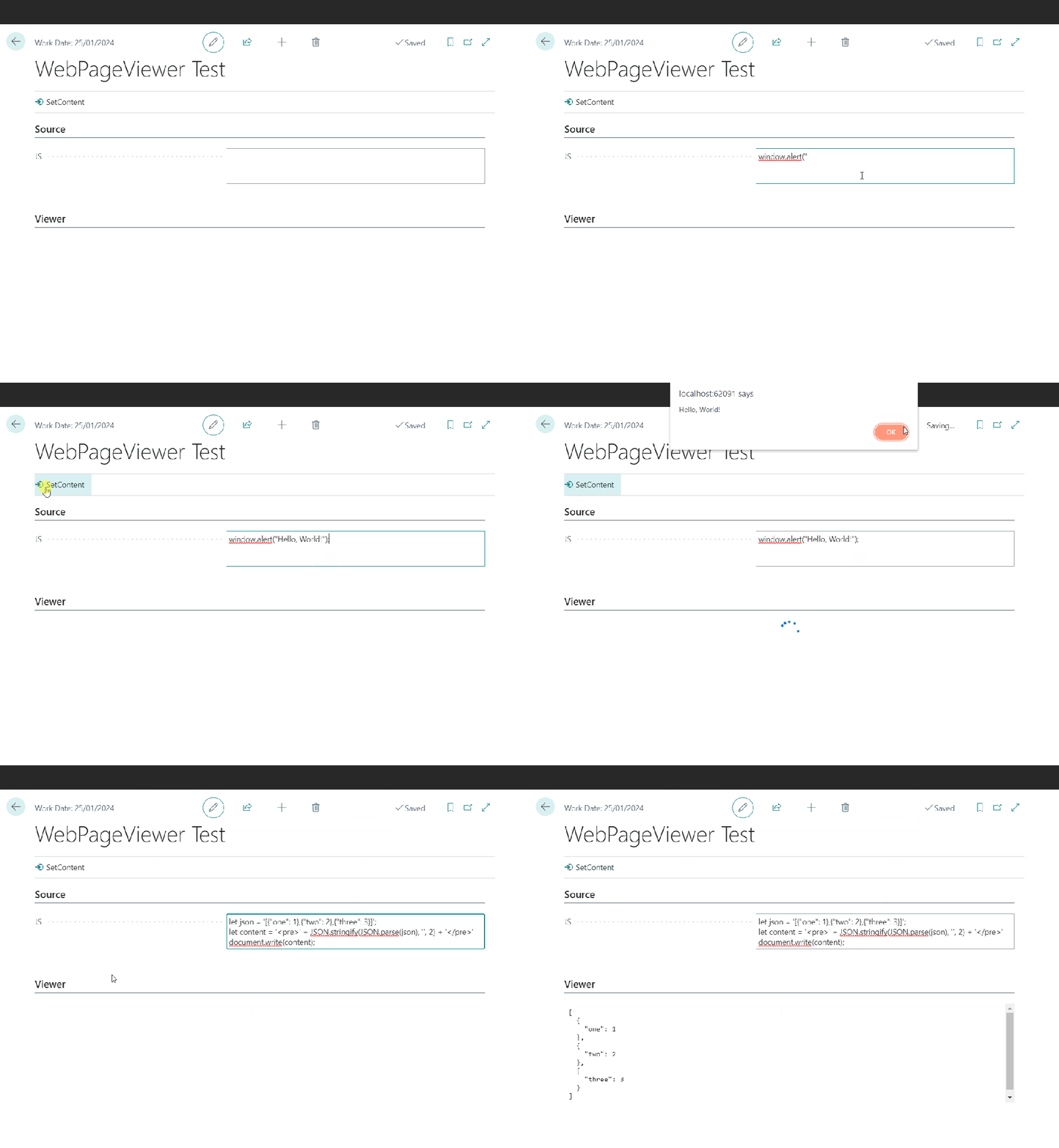
The WebPageViewer add-on has an overload to accept some JavaScript. You can use that to execute arbitrary script locally. WebPageViewer.SetContent(HTML: Text; JavaScript: Text);
Executing JavaScript with WebPageViewer
JSON Formatting
This post starts with me wanting to format some JSON with line breaks for the user to read. It’s the response from an Azure Function which integrates with a local SQL server (interesting subject, maybe for another time). The result from SQL server is serialized into a (potentially very long) JSON string and this is the string that I want to present in a more human-readable format.
Sometimes I converge on a solution through a series of ideas, each of which slightly less bad than the previous. This was one of those times. If you don’t care about the train of thought then the solution I settled on was to use the JavaScript parameter of the WebPageViewer’s SetContent method.
If you’re still here then here are the stations that the train of thought pulled into, starting with the worst.
Requirement
Have some control on my page for the user to view the JSON returned from the Azure Function, formatted with line breaks.
1. Format at Source
Why not just add the line breaks when I am serializing the results in the C# of my Azure Functions? That way I don’t need to change anything in AL.
No, that’s dumb. That would make every response from the function larger than it needs to be just for the rare occasions when a human might want to read it. Don’t do that.
2. Call an Azure Function to Format the Result
I could have a second Azure Function to accept the unformatted result and return the formatted version. I could have a Function App which runs node.js and return the result in a couple of lines of code.
Wait, that’s absurd. Call another Azure Function just to execute two lines of JavaScript? And store the Uri for that function somewhere? In a setup table? Hard-coded? In a key vault? Seems somewhat over-engineered.
3. Create a User Control
Hang on. I’m being thick. We can execute whatever JavaScript we want in a user control. I can create a control with a textarea, or just a div, create a function to accept the unformatted JSON, format it and set the content of the div. No need to send the JSON outside of BC.
Closer, and if you want more control over how the JSON looks on screen probably the best bet. But, is it really necessary to create a user control just to execute some JavaScript? Still seems like too much work for what is only a very simple problem.
If you pass some script it will be executed when the page control is loaded. Perfect for what I need. I can just use the JSON.parse and JSON.stringify functions to read and then re-format my JSON text. I’m also wrapping it in pre tags and removing any single quotes in the text to format (because they will screw the JavaScript and I can’t be bothered to handle them properly).
The AL code ends up looks like this:
local procedure SetResult(NewResult: Text)
var
    JS: Text;
begin
    NewResult := NewResult.Replace('''', '');
    JS := StrSubstNo('document.write(''<pre>'' + JSON.stringify(JSON.parse(''%1''), '''', 2) + ''</pre>'');', NewResult);
    CurrPage.ResultsCtrl.SetContent('', JS);
end;
If you’re not using 26 single quotes in three lines of code then you’re not doing it right 😉




 James Pearson