
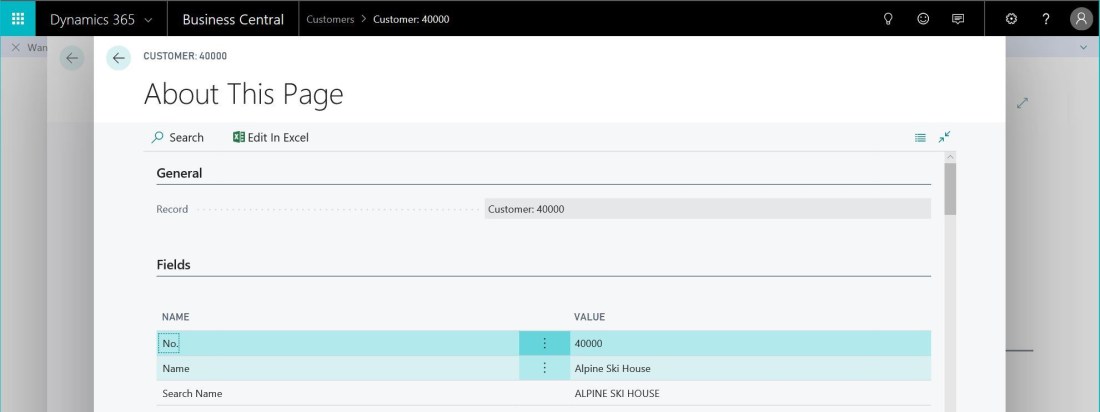
We’re entering a brave new world of web-client-only experience with Dynamics 365 Business Central. That is simultaneously great news and presents a challenge for those who know and love the Windows client.
It doesn’t take long for most consultants to realise that they can’t view the “About this Page” (Ctrl+Alt+F1) page in the web client – and to get upset about that. In my experience it was used a lot to read values of fields in the current record that aren’t visible on the page.
Hopefully this is something that Microsoft will address in a future version of the client, but in the meantime I’ve created an extension that provides some of the functionality.
You can download the extension here: James Pearson_About This Page_1.0.4.0
Disclaimer: obviously, if you choose to publish and use this extension in your tenant you do so at your own risk. I don’t take responsibility for any problems you run into.
- Extract zip
- Use the Upload Extension command on the Extension Management page to publish and install the .app file from #1 into the tenant
- Wait for the publish to finish (see the Deployment Status page for more info)
- Navigate to a page you’re interested in
- Search for (bulb icon in the top right corner, Alt+Q) “About This Page”
- Enjoy
This is an initial version and various improvements could be made, if Microsoft don’t give us a better solution first. You can find the code and contribute here: https://github.com/jimmymcp/BusinessCentral-AboutThisPage
Update: v1.0.4
The “About This Page” page now includes the source table and page details. I’ve also renumbered the objects into a different range as 80,000 – 99,999 is going to be reserved for extension objects.
 James Pearson