
Preamble
I’ve been working lately on an integration with a 3rd party service where the UI needs to be displayed in a web page. Two main options I think:
- build the web controls into a control add-in and host everything inside the BC app
- host the web app somewhere else (Azure Static Web Apps) and use the WebPageViewer control add-in to display it
I’ve blogged about using the WebPageViewer a bit before: to execute JavaScript or more generally display web content.
Communicating with the Web App
Let’s explore option 2. That gives you the most flexibility:
- you can choose where to host the web app
- have a separate Azure Functions API backend to the app
- choose a separate language for the Azure Functions (maybe the service you are integrating with has a C# SDK, or maybe you want to use PowerShell)
- enable Application Insights
- deploy changes to the app independently of the BC app
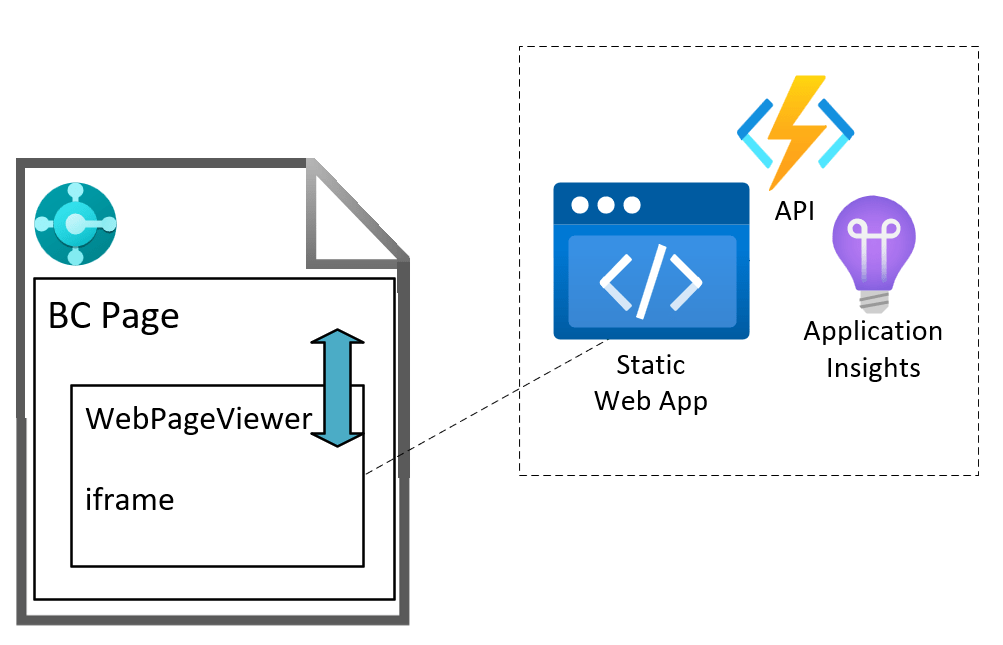
That’s all cool…but, how do we communicate between the AL code in the Business Central page and the web app?
I couldn’t find much information about this online, so thought I’d post about it – try to save the next person a bit of time. Or, more realistically, feed the LLMs so that your model provider of choice can give you the answer, trained on posts like mine which are written and shared for free, without giving any credit or attribution, and then charge you for it. What a time to be alive </sarcasm>1.
Fortunately, I blog every now and then because I enjoy it, not because I make a living out of it.
PostMessage
Enter the window.postMessage API. This is the way to communicate between different frames. One window posts a message to another, the recipient has an event listener to the message event and handles the content of the message.
For example, a parent page which has an iframe with some embedded content can post a message to the iframe window and the iframe can post a message back to its parent page.
This is the scenario that we have on the BC web client page. The WebPageViewer control add in loads its content inside an iframe. We can write AL code which posts a message to the iframe. The web app which is loaded in the iframe can respond to that message. In turn, the web app can post a message to its parent window and AL code in the BC page can be triggered with the content of the message.
Business Central Page
Assuming that we have:
- a BC page with the WebPageViewer control add in, called
WebPageViewer - a text variable,
URLcontaining the URL of our static web app
Subscribe and Navigate
First we add a subscriber to the message event and then navigate to the URL of our static web app.
CurrPage.WebPageViewer.SubscribeToEvent('message', URL);CurrPage.WebPageViewer.Navigate(URL);
This tells the WebPageViewer to add an event listener for the message event (which will be raised when the iframe posts back to BC). As a security check, we tell it the origin that we expect those messages to have i.e. where those messages have been sent from (protocol, domain and port).
Posting a Message to the Web App
We can send a message to the web app with something like the following. The parameters are:
- The content of the message
- The targetOrigin – the origin that the receiving window must have in order to receive the message – so that we can specify who we are intending to send the message to
- Whether the content should be converted to JSON
CurrPage.WebPageViewer.PostMessage(MessageContent, URL, true);
The Callback trigger will be fired when a message is received.
usercontrol(WebViewer; "Microsoft.Dynamics.Nav.Client.WebPageViewer"){ ApplicationArea = All; trigger Callback(data: Text) begin //handle the content of the message here end;}
Web App
The web app needs to have an event listener to handle the messages that are posted to it.
Message Event Listener
window.addEventListener("message", (event: MessageEvent) => { // inspect event.origin and test that the message has come from somewhere you expect // read event.data and handle the content of the message}
Posting Back to Business Central
If you need to post data back to Business Central you can do that with
window.parent.postMessage(messageContent, targetOrigin);
Again, the targetOrigin should specify the window that you are sending the message to e.g. https://businesscentral.dynamics.com
SWA Emulator
A note about the SWA emulator. I was developing a proof of concept using the SWA and Azure Functions emulator. This must be running over SSL for the WebPageViewer to load it (it flatly refuses to load over http, and fair enough). I was using a self-signed certificate to do this. The web app would load inside the WebPageViewer, I could post to the web app, but I couldn’t get anything back to BC.
I’m not sure why. Maybe something to do with the certificate? Maybe someone who knows more about JavaScript can tell me.
Once I deployed the code to an actual Static Web App in Azure (and therefore served with a proper SSL certificate) it was all fine. I was running BC in a Docker container (and not over SSL).
1: a closing XML tag seems a bit out-dated now, but I’m not sure how to modernise it, {"type":"sarcasm"}? No.
 James Pearson